
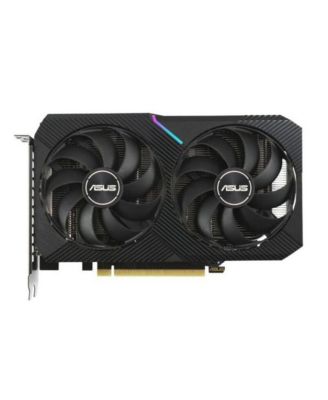
ASUSDUAL-RTX3060-O12G-V2 12 GB GDDR6 with Two Powerful Axial-tech Fans LHR Graphics Card
Product details
Web ID: 1778696269 reviewssorted by Newest
Best card 4 the $$, when under budget constraints
If you can't afford the best of the best... This card boosts 12 GBS of gddr6 PlayStation1234 emulators, realtime movies, with no lag simultaneously while downloading and burning Blu-ray discs and playing fortnight. Though you should know the performance notes don't tell you the rest of the PC helping the GPU... So I will cause this card is absolutely excellent 👌 for the price. Mobo. Asus x570 WiFi pro RAM. 64GBs Corsair vengeance DDR43200 CPU. AMD Ryzen 7 5800x3d Nvme.2 crucial 2tb 7100mb/s read/write SPD. AIO. Asuse rogue ryujin 3 360 lcd&fan w/ 360mm rad(radiator). PSU. Apeviva 1200 watt PSU, modular Display1 75" Tcl 4k TV Display2 Asus rog 32"lcd GPU. Asus Dual RTX-3060-O12G-V2 12 GBS gddr6 AGPU. Nvidia Tesla k80 w2 GPUC sores and 24 GBS gddr5 to back intense calculations.W Turbo lower fan additionally. CASE. Thermal take Xaser3 aluminum full Tower Keyboard1 led tecknet led wired Keyboard2 Logitech g7 trackball1 wired porlei led high dpi Trackball2 Logitech m575s
Customer review from https://www.asus.com
Perfect for me
It works great, I’m very satisfied with its performance
Customer review from https://www.asus.com
Research before you buy but very good in use.
Good gpu once power needs figured out. Study first
Customer review from https://www.asus.com
3060 gpu
Good price for a good gpu however it is getting a little older
Customer review from https://www.asus.com
Would be great if the Linux Drivers in PopOS worke
Would be great if the Linux Drivers in PopOS worked well.
Customer review from https://www.asus.com
Response from https://www.asus.com
Dear Vyechi, Thank you for your comment. We do understand the inconvenience this may have caused if you are experiencing issue using this graphic card in Linux. Unfortunately, this graphics card was only released with Windows OS support only, we don't provide Linux drivers or Linux support. Should you need further assistance with the product, please email me at cl-rodel@asus.com and I would be more than happy to help. Or, you are most welcome to call Product Support Hotline at: 1(888) 678-3688. Also, you can chat with an ASUS live support agent from the link: https://www.asus.com/us/support/article/1135/. Thank you for choosing an ASUS product. Regards, Rodel SUS Customer Loyalty
Great GPU
Works perfect for current office build will be running cad an 3d software
Customer review from https://www.asus.com
Great card
A great card with high performance. I was able to play various high end games with maximum graphics with a stable 60 fps with a 1440p monitor, while the temperature never went above 80°C.
Customer review from https://www.asus.com
Cooling
Over heats, I don't use any over clocking, system has 8 internal fans plus 2 fans on RTX3060.
Customer review from https://www.asus.com
Response from https://www.asus.com
Dear Phil76, Thank you for reaching out regarding your ASUS DUAL-RTX3060-O12G-V2 graphics card. We sincerely apologize for the overheating issues you’re experiencing, especially given that you are not using overclocking and already have multiple fans installed in your system. To assist with troubleshooting, we recommend following the steps outlined in our FAQ guide linked below. If the issue persists after these steps, we recommend contacting our support team directly at https://www.asus.com/us/support/callus/ so we can assist further with advanced diagnostics or warranty service. We stand behind our products and continuously strive to improve our products and processes to achieve customer service excellence. For more information, email us at customerloyalty@asus.com and include the case number "N2506001321-0002" as a reference. We will do our best to resolve your case quickly. Your feedback is very important to us and enables us to improve our support channels. Thank you for choosing ASUS. Best Regards, Chantae ASUS Customer Loyalty US Support [Graphics Card] Cooling – Troubleshooting Guide: https://www.asus.com/support/faq/1056058/