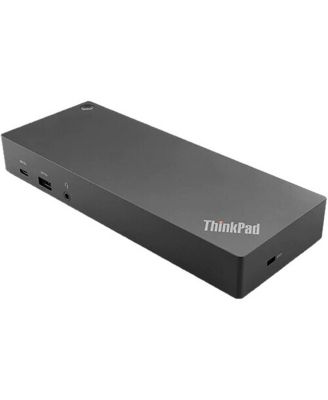
ThinkPad Hybrid USB Type-C Laptop Dock with USB Type-A Adapter, Black

Shipped and sold by Adorama
$259.99
Color:Black
Offers & perks
6-month financing with Macy's Card.

Product details

Web ID: 23962405

Where versatility meets functionality, the ThinkPad Hybrid USB-C with USB-A Dock, in a sleek black finish, is designed to amplify your laptop's capabilities, making it an ideal solution for mixed-PC or shared-desk environments. This high-tech docking station is engineered with enterprise-class manageability features, including PXE boot and MAC address pass-through, enhancing your control and efficiency.The ThinkPad Hybrid Dock is equipped with three high-speed USB 3.1 ports, offering rapid data transfer and charging capabilities. Included with the dock is a USB-C to USB-A adapter, ensuring compatibility with non-Lenovo or USB-C laptop computers, making it a universal docking solution. This feature-rich dock is designed to replicate ports, allowing you to connect a multitude of devices seamlessly.One of the standout features of this compact and stylish dock is its support for dual monitor setups. It can handle up to dual UHD 4K resolution, providing you with crisp, clear visuals for an enhanced viewing experience. Moreover, it supports rapid charging for ThinkPad notebooks, ensuring your devices are always ready to perform.Whether you're connecting external monitors, keyboards, printers, or other peripherals, the ThinkPad Hybrid USB-C with USB-A Dock is a durable and user-friendly solution that enhances your laptop's functionality and productivity..

  • Product Features

    • Enterprise-class capabilities with PXE boot, Wake-On-Lan, and MAC address pass-through.
    • Laptop Dock with USB Type-A Adapter, Supports ThinkPad RapidCharge.
    • Connects with up to dual UHD 4K display with DP and HDMI ports.
    • Delivers up to 10Gbps data transfer speed on 3 x USB 3.1 ports.
    • STREAMLINED POWER DELIVERY - Provides 90W power output via ThinkPad Slim-tip, ensuring your laptop stays charged while you work, reducing downtime and increasing efficiency..
    • Wipe clean
    • Imported
  • Product Dimensions

    • 1.05
  • Shipping & Returns

    • This item qualifies for Free Shipping with minimum purchase! exclusions & details
    • Orders will not ship in Macy’s packaging.
    • This item may not be shipped to Alaska, American Samoa, Guam, Hawaii, Marshall Islands, U.S. Virgin Islands, Puerto Rico, Palau, or the Pacific Islands.
    • California and Minnesota customers call 1-800-289-6229 for Free Shipping information.
    • For complete details, see our Shipping and Returns policies.
    Your security is our number one concern.

    To report suspicious activity, please reach out to Macy's at 1-800-289-6229 or click here to report online.

Ratings & Reviews

Here's what customers think
  • The dock provides a reliable and flexible desktop setup, allowing users to connect multiple monitors, USB devices, and Ethernet.
  • It is compatible with a range of Lenovo laptops and some non-Lenovo models.
  • Setup is generally straightforward, though a few customers needed additional guidance.
  • The dock supports high-resolution displays and provides sufficient power delivery.
  • While the price point is relatively high compared to other options, the dock's performance and versatility are praised by the majority of customers.
AI-generated summary from 417 customers reviews.

4.4/5

417 star ratings & reviews

Write a Review
297
49
26
12
33

12 customer images

417 reviewssorted by Newest

External reviewer
30 days ago
Incentivized review

Returned the dock

I had to return. Would not communicate with my nee Lenovo laptop.

Customer review from lenovo.com

External reviewer
1 month ago
Incentivized review

Perfect

Allows the ability to set up dual monitors, various peripherals, etc for my home office without much thought or angst.

Recommends this product

Customer review from lenovo.com

External reviewer
2 months ago
Incentivized review

Docking station

I have both HDMI monitors plugged in but my third monitor, a LENOVO monitor with an HDMI can’t be connected. The sales lady said I could have three monitors on the docking station but there isn’t anything to plug it into.

Customer review from lenovo.com

External reviewer
8 months ago
Incentivized review

ThinkPad Hybrid USB-C Model 40AF0135US

The ThinkPad Hybrid USB-C Model 40AF0135US hooked up easily and seems to be working fine.

Customer review from lenovo.com

External reviewer
8 months ago
Incentivized review

Reliable docking station

Fine docking station. Works as expected, no issues or complaints thus far.

Recommends this product

Customer review from lenovo.com

External reviewer
9 months ago
Incentivized review

Having a bit of trouble Power button doesn't work.

Having a bit of trouble. The power button doesn't work. I'm not suer if it is a software problem or hardware. I did download the software. All other connections work fine.

Customer review from lenovo.com

Response from lenovo.com

Lenovo9 months ago

Hello, We sincerely apologize for the inconvenience you've encountered with the ThinkPad Hybrid USB-C. This is certainly not the experience we aim to provide to our customers, and we understand how inconvenient it must be to face such issue on a brand new device. We are committed to resolving the issue as quickly as possible. If you haven't already, please get in touch with our customer support team at 1-855-253-6686. We look forward to addressing any concerns and resolving the issue. Regards, Thomas, Lenovo

External reviewer
9 months ago
Incentivized review

Great ThinkPad Dock

Moving to all genuine Lenovo docks has saved me tons of time to focus on other issues. No complaints about any of the ThinkPad docks we use.

Recommends this product

Customer review from lenovo.com

External reviewer
10 months ago
Incentivized review

Best docking station

Purchased this for the power users in the office. Best docking station we have had.

Recommends this product

Customer review from lenovo.com