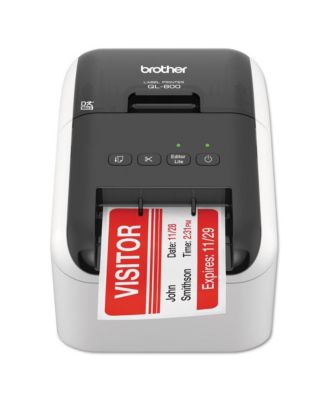
QL-800 5 in. x 8.75 in. x 6 in. 93 Labels/min Print Speed High-Speed Professional Label Printer

Shipped and sold by Essendant Co
$145.86
Color:No Color
Offers & perks
6-month financing with Macy's Card.

Product details

Web ID: 25514112

Brother QL-800 high-speed label printer produces cost-effective paper labels for packages, envelopes, folders, name badges and postage. Prints up to 93 standard address labels per minute with sharp 300 dpi black text. Built-in auto cutter cuts single or multiple labels to reduce waste. Plug-and-Label enables basic printing from Windows PCs without software P-touch Editor for Windows and Mac supports advanced designs.

  • Product Features

    • Create cost-effective paper labels for packages, envelopes, file folders, name badges and postage.
    • Super-fast, printing up to 93 standard address labels per minute with black text at 300 dpi.
    • Prints Brother DK pre-sized, easy-peel labels and continuous-length paper and film tapes.
    • Capable of printing postage for packages and envelopes right from your desk.
    • "Plug and Label" feature lets you create and print labels without installing software on Windows PCs.
    • Paper
    • Imported
  • Product Dimensions

    • 5 in.
    • 6 in.
    • 4.59
  • Shipping & Returns

    • This item qualifies for Free Shipping with minimum purchase! exclusions & details
    • Orders will not ship in Macy’s packaging.
    • This item may not be shipped to Alaska, American Samoa, Guam, Hawaii, Marshall Islands, U.S. Virgin Islands, Puerto Rico, Palau, or the Pacific Islands.
    • California and Minnesota customers call 1-800-289-6229 for Free Shipping information.
    • For complete details, see our Shipping and Returns policies.
    Your security is our number one concern.

    To report suspicious activity, please reach out to Macy's at 1-800-289-6229 or click here to report online.

Ratings & Reviews

Here's what customers think
  • The Brother QL-800 label printer is praised for its great performance, ease of use, and high-quality output.
  • Users highlight its ability to create professional-looking labels, intuitive software, and convenient features like two-color printing.
  • The printer is described as reliable and versatile, delivering excellent results for most users.
  • However, some customers experienced a learning curve with the software and compatibility issues with certain operating systems.
AI-generated summary from 138 customers reviews.

4.1/5

138 star ratings & reviews

Write a Review
82
22
11
7
16

138 reviewssorted by Newest

Roger S
3 months ago
from WA

Love the QL800

Love the QL800, after using DYMO for years this is totally a breath of fresh. Never have I had any printer print so fast and acurrately. Is nice to be apply to print spreadsheets from Excel along with individual labels.

Customer review from brother-usa.com

Dave
1 year ago
from Boise, ID

Great little label printer, except...

This is a very good label printer. Unfortunately, it won't allow me to print in red anymore.

Customer review from brother-usa.com

Adam Roof
1 year ago
from Land o lakes fl

Drivers don’t work

Can’t make the drivers work with the printer so I can’t use it.

Customer review from brother-usa.com

The Bike Men of Flagler C
1 year ago
from Flagler County, Florida

Helping at our volunteer charity bike shop

Great product and software, easy to set up and use

Customer review from brother-usa.com

Wendy P
1 year ago
from Middletown, CT

Good Printer

Good printer. We use this to make barcode labels for our store. We've only been using it for a few months, but it seems to be a workhorse.

Customer review from brother-usa.com

Tiger
1 year ago

Works great

Easy to set up, works great. The brother GL-800 has saved us money.

Customer review from brother-usa.com

PAEcologist
1 year ago
from Lewisburg, PA

Delighted with the Brother QL-800

The QL-800 is a major step up from my decades-old Dymo LabelWriter 330 Turbo. After a couple of months of use -- I am delighted that I made the decision to move from Dymo to Brother! The Brother software allows me to format labels in ways that were impossible with my Dymo. The software was easy to learn despite offering numerous custom options. The Brother labels themselves have a smoother, nicer finish than Dymo labels and the text on the Brother labels is sharper, easier to read. I have a variety of label needs so I frequently change label cartridges. Doing so is fast and easy with the Brother QL-800. Dymo labels yellowed considerably over time -- any label exposed to office lighting soon looked sufficiently poor that I reprinted and covered aged labels. It's too early to know how the Brother labels will age but I hope they will hold up longer over time.

Customer review from brother-usa.com

Rabbit
2 years ago
from Oklahoma City, Oklahoma

Great little printer

Easy to set up and use. I printed out some labels within an hour.

Customer review from brother-usa.com