
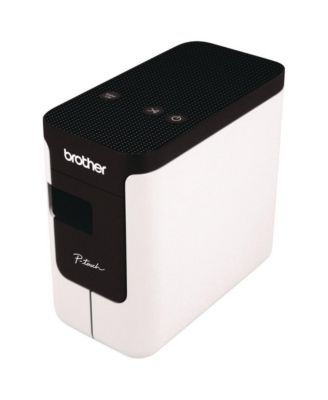
Brother P-TouchPTP700 3.1 inch x 6 inchx 5.6 inch Print Speed PC-Connectable Label Printer
Product details
Web ID: 27365816153 reviewssorted by Newest
Troublesome
I bought a PT700 and used iton Win7. Everything worked fine. Installed the software and away I went. However, I thought it might be nice to use it on my WIN10/11 machine so I downloaded the software from the Brother site. It took about 30minutes fro it to install which wouldn't be so bad, but then when I opened the printer software all my previously saved labels had been wiped. Why would anyone do this - No warning no backup attempt just labels gone. I'm not a happy bunny and it stinks
Customer review from Brother Europe
Response from Brother Europe
Looks like default option to install editor software for Windows 7 is P-touch Editor 5.4. Whereas default option to install editor software for Win10/11 is P-touch Editor 6. But if this is same PC then you may still have both versions of editor software installed. Default install paths are as below: - C:\Program Files (x86)\Brother\Ptedit54\ptedit54.exe C:\Program Files (x86)\Brother\P-touch Editor\6\PtouchEditor6.Wpf.exe So if you still have Editor 5.4 installed and can open it, please check Tools > Options > Path to see where your previous files are stored. If they are all there probably take a backup first and you could possibly copy them to use them with Editor 6 too. Or just continue using Editor 5.4. As ever if you need further support with this please get in touch with support here: - https://www.brother.co.uk/support/contact-us/technical-support
Brother PT-P700 Review
I purchased the Brother PT-P700 to use exclusively as a label maker for my file folders and the keep track of my oil changes that I've done in my trucks. I've had a really nice experience over the last 6 years. I've labeled reminders for oil changes, and folders for so many files. I am so glad I made the purchase and would not trade it for anything! It's dependable and the software keeps tracks of what you'd like to save for future needs!
Customer review from brother-usa.com
Good little label printer
This is a great little unit. Shame it has so much label waste due to the distance of the blade and case I guess.
Customer review from brother-usa.com
Response from brother-usa.com
Thanks for taking the time to review your experience with the Brother PTP-700. We appreciate your feedback. Below is an FAQ answer that will help save tape when printing labels: https://support.brother.com/g/b/faqend.aspx?c=us&lang=en&prod=p700eus&faqid=faqp00001472_003 If you still need assistance, please contact the Brother USA support team at: https://www.brother-usa.com/support
Nice Label Printer
This works just perfect for me. I've had two other P touch printers. Both were nice. The first one became nonsupported so I bought another one which I liked, but I never needed a keyboard because I do all the graphics on my computer, so I just wanted a label printer! This is a perfect choice for anyone. I was skeptical at first, but this is the best product out there.
Customer review from brother-usa.com
What a great tool!
This little Label Printer is Awesome! It works great. You can save your templates for quick duplicate printing.
Customer review from brother-usa.com
Great Label Maker
The labels are top quality and the backing on the labels is split down the middle which makes peeling the labels a breeze.
Customer review from brother-usa.com
The PT-P700 is a very handy printer!
A compact, efficient printer. It is easy to load new tape cartridges. One small complaint is that every time you print a 1inch piece of tape is cut off and wasted.
Customer review from brother-usa.com
{P-Touch Label Printer
I bought this to replace and older edition and It is so versatile. Good choice.
Recommends this product
Customer review from Brother Europe