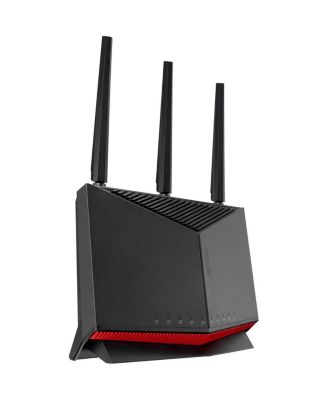
RT-BE86U BE6800 Dual-Band Wi-Fi 7 AiMesh Router, Black

Shipped and sold by Adorama
4.5 (15)
$259.99
Color:Black
Low Stock
Offers & perks
$20 Star Money per $100
See offer details
6-month financing with Macy's Card.

Product details

Web ID: 23968027
Next Level PerformanceDominate your network with blazing performance. For those who demand the absolute best, today and tomorrow, the ASUS RT-BE86U is powered by next-level Wi-Fi 7, delivering lightning-fast dual-band speeds of up to 6800 Mbps for your connected living. The RT-BE86U boasts a monster 20G combined network capacity, unlocking cutting-edge 10G networking with a 10 Gbps WAN/LAN port and up to four 2.5 Gbps LAN ports. Meanwhile. the new ASUSWRT 5.0 ensures a worry-free network experience from end-to-end and 24/7.IEEE 802.11be - Beyond Fast Wi-Fi 7The RT-BE86U boasts dual-band Wi-Fi 7 technology, achieving blazing-fast speeds of up to 6800 Mbps, ensuring seamless streaming, gaming and data-intensive tasks. Whether you're binge-watching your favorite shows or collaborating in a virtual meeting, this router delivers.
  • Product Features

    • Wi-Fi 7 delivers up to 6800 Mbps, 10G WAN/LAN, and 20G total network capacity
    • Dual-band Wi-Fi 7 speeds up to 6800 Mbps for seamless streaming and gaming
    • 10G WAN/LAN + 4x 2.5G ports for high-speed, flexible multi-WAN configurations
    • One 2.5G LAN port optimizes gaming traffic for lag-free, competitive gameplay
    • Trend Micro security shields your network with real-time protection 24/7
    • Wipe clean
    • Imported
  • Product Dimensions

    • 4.20
  • Shipping & Returns

    • This item qualifies for Free Shipping with minimum purchase! exclusions & details
    • Orders will not ship in Macy’s packaging.
    • Enjoy a longer window to return most of your holiday purchases. See our Extended Holiday Return Policy to see if this item qualifies.
    • This item may not be shipped to Alaska, American Samoa, Guam, Hawaii, Marshall Islands, U.S. Virgin Islands, Puerto Rico, Palau, or the Pacific Islands.
    • California and Minnesota customers call 1-800-289-6229 for Free Shipping information.
    • For complete details, see our Shipping and Returns policies.
    Your security is our number one concern.

    To report suspicious activity, please reach out to Macy's at 1-800-289-6229 or click here to report online.

Ratings & Reviews

4.5/5

15 star ratings & reviews

Write a Review
86.7% of reviews have 5 stars
13
0.0% of reviews have 4 stars
0
0.0% of reviews have 3 stars
0
6.7% of reviews have 2 stars
1
6.7% of reviews have 1 star
1

5 customer images

15 reviews
BrentB
25 days ago
from NW Georgia

This router was super easy to install

My network performance more than doubled with this new router.

Customer review from https://www.asus.com

Carolee
27 days ago
from Greenville, SC

Outstanding!

First time owing an ASUS and I’m pleasantly surprised at how easy it was to install and use the app. I am a woman in her 80’s with enough tech savvy to make me dangerous! It’s been weeks with no problems so I’m happy.

Customer review from https://www.asus.com

JMRB
1 month ago
from Bellingham, WA

Great Router

Previously I had a Netgear router and the RT-BE86U is way better in so many ways. Set up was very easy and app easy to use. Also the reception at the farthest location of my house is very good.

Customer review from https://www.asus.com

External reviewer
1 month ago

I wanted the RT-BE86U to work for me.

For a guy in his late eighties, setting this RT-BE86U up to replace an Apple Extreme router couldn't have been more challenging. There are too many apps, too much initialization; it's confusing for me to know what each one is for. I used one app, the Asus Router, to get set up for the computer, iPad, and iPhone. They connected and worked as before the router replacement. During the setup process, I split the 2.4 and 5GHz bands. Internet speed on the Mac Studio using the 5GHz band was less than half of the 2.4GHz band. I stayed with 2.4GHz. The stumbling block is convincing the HP 8620 printer to join the 2.4GHz network. After entering the name and password of the network that works for the other devices, the printer refuses to connect. The 5GHz doesn't work with the printer either. The network name and password are the same as was used for the Apple router. Reconnecting the Apple router put the printer back in service. I don't know what I can do or what I'm missing in the instructions. But the Asus router is going to be returned.

Customer review from https://www.asus.com

Response from https://www.asus.com

CLM1 month ago

Dear Valued Customer, Thank you for your comment. We do understand the inconvenience this may have caused if you experienced difficulty setting up this router and the connection problems with your HP printer. To resolve this connection issues with your HP printer, if this is a legacy device, connect it manually to the 2.4GHz bandwidth. Additionally, reset your printer's network settings, you may need to consult your printer's manual or contact your printer's product support for expert advice. Legacy devices may not work properly with WIFI-7, please check updates for these devices. Also, try connecting these manually to either 2.4GHz or 5GHz. Furthermore, we recommend updating the router's firmware if it is running with an older version. Firmware is available for download at: https://www.asus.com/networking-iot-servers/wifi-routers/asus-wifi-routers/rt-be86u/helpdesk_bios?model2Name=RT-BE86U. For helpful tips on how to setup this router properly, visit our Product Support page at: https://www.asus.com/support/faq/1016107/. A video tutorial is available at: https://encrypted-vtbn2.gstatic.com/video?q=tbn:ANd9GcTI6UhyCcKDFUJGTuRzi8N6R29TWiZ7vDB--qQfnXOJ8vjL8Anq . Should you need further assistance with the product, please email me at cl-rodel@asus.com and I would be more than happy to help. Or, you are most welcome to call Product Support Hotline at: 1(888) 678-3688. Also, you can chat with an ASUS live support agent from the link: https://www.asus.com/us/support/article/1135/. Thank you for choosing an ASUS product. Regards, Rodel ASUS Customer Loyalty

Billv
3 months ago
from New Hampshire

Great wifi router

Works great easy setup fast have been using asus for years

Customer review from https://www.asus.com

reviewer1
3 months ago
from USA

Nice, powerful router.

Setup was easy. The instructions worked for setup with the computer. The router works with all my hardware & has a stronger signal than my old router.

Customer review from https://www.asus.com

The Pied Piper
3 months ago
from Idaho

1 GIG POWER

Works great with 1gig. Now I'm streaming like it should.

Customer review from https://www.asus.com

Lencho
4 months ago
from Phoenix

Unable to setup wifi

This is the worst router I have purchased. All my other aces routers worked perfectly this one I set it up and then Wi-Fi drops I can't access anything via Wi-Fi can't access anything via the ports the only port that works is the port which is tied in with the internet port I am going to request a refund on this product.

Customer review from https://www.asus.com

Response from https://www.asus.com

CLM4 months ago

Dear Lencho, Thank you for your comment. We do understand your disappointment with this router and the inconvenience this may have caused if you are experiencing wireless connection drop. To resolve this issue, place the router in the center of the area you want to cover, avoid placing the router near metal objects, electronic devices or direct sunlight, position the router on a flat, hard surface and halfway between the floor and ceiling. Additionally, dense building materials, such as gypsum, concrete walls and planks can affect Wi-Fi signal penetration. Also, we recommend updating the router's firmware if it is running with an older version. Firmware is available for download at: https://www.asus.com/us/networking-iot-servers/wifi-routers/asus-wifi-routers/rt-be86u/helpdesk_bios?model2Name=RT-BE86U. Furthermore, check if the PC or device connecting to the router is working properly and within range to the router, the router is within 30 feet to the ISP's modem, if not wired with a network cable, and ISP's internet service or connection is working properly or stable. Legacy devices may not work properly with WIFI-7, please check updates for these devices. Also, try connecting this manually to either 2.4GHz or 5GHz. Should you need further assistance with the product, please email me at cl-rodel@asus.com and I would be more than happy to help. Or you are most welcome to call Product Support Hotline at: 1(888) 678-3688. Also, you can chat with an ASUS live support agent from the link: https://www.asus.com/us/support/article/1135/. Thank you for choosing an ASUS product. Regards, Rodel ASUS Customer Loyalty