
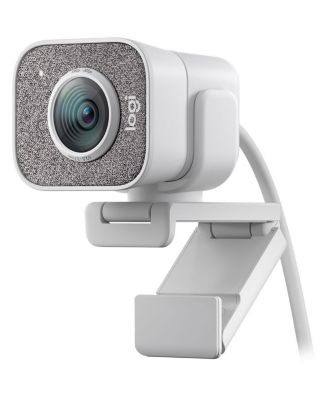
LogitechStreamCam Full HD Live Streaming Webcam
LogitechStreamCam Full HD Live Streaming Webcam
Product details
Web ID: 2725869621 reviewssorted by Newest
Not for Mac M1, M2
I cannot recommend this product if you have a Mac with M1 or M2. In any case, not together with Teams, as it causes both picture and speech to lock up after about 15 minutes. Have tested on two mac computers and get the same error. When testing with a Windows computer, the error does not appear.
Customer review from Logitech
Response from Logitech
Hi Mike, Thank you for your review, we're sorry the Logitech StreamCam did not meet your expectations. We will pass your feedback along to our team. We always want to ensure we are providing our customers with the best products and experience. If you need additional assistance, we will be happy to help at: support.logi.com
Lots of problems
The first problem I encountered was that my camera keeps turning off and the computer doesn't recognize it. Another problem is that when my computer recognizes it, it says that it is not usb 3.0. I bought an extra 3.0 camera extender and plugged it into the 3.0 port. I checked that the ports are working, everything is great. I'm still trying to find solutions for the camera.
Customer review from Logitech
Response from Logitech
Hi noclip, Thank you for your review - we're sorry to hear you're having issues with our Logitech StreamCam. This is not the experience we expect. To discover the best options and next steps we'd love to get connected with our Care Team! Our team will reach out to you shortly via a support ticket. We would like to thank you again for your feedback.
Non-intuitive, bad USB, poor online documentation
I got this as a gift, which is great because I'd be returning it otherwise. Problem 1: it's USB-C and does not come with an adapter. I built my computer last year, and I don't have a USB-C plug, so I'm unsure how that choice was made. Problem 2: It records in 4:3 with no logical reason and resolution is not an option in GHub, which is the only software recommended with this cam. Problem 3: It's fairly low quality image, I do not support this for streaming at all, especially given its poor software support. It probably works for Zoom, but I'm definitely never replacing my C920 with this. Stressful and unsatisfactory to use.
Customer review from Logitech
Response from Logitech
Hi Kathryn, Thank you for your review - we're sorry to hear you're having issues with our Logitech StreamCam. This is not the experience we expect. To discover the best options and next steps we'd love to get connected with our Care Team! Our team will reach out to you shortly via a support ticket. We would like to thank you again for your feedback.
A great cam, received feedback
A great cam, received feedback that it is not choppy like my other Webcam which is also Logitech. Much more customizable than other cams. Only feedback is that I was disheartened to not see a anti spy cover. When I'm not using it, I want the security of knowing it is blocked and no one can see me whether by my carelessness or otherwise.
Customer review from Logitech
It will take a lot
It will take a lot of effort to install but once done, the picture and quality are worth it.
Customer review from Logitech
Leaving Logitech over this
doesn't handle light all that great.. needs quite low light actually to produce great picture... picture is good at best i could go on and on about how i spent a lot of money to try to connect this camera to my computer, but i'll keep it short. Logitech made a specific design decision with this camera: to have a SHORT cord, and no option to extend it. I have spent big money on the most specialized industry extension cables for USB-C and I learned yesterday from an industry insider that Logitech actually intentionally crippled extendability in their USB-C connection. forced obsolescence is a disgrace to your name Logitech and an insult to the people who paid hard earned money for a StreamCam. I have been a logitech user for YEARS, but it's down to a Blue microphone and a gamepad now... and I won't be replacing those with Logitech when they die. It's been real, Logi, but you've obviously made your decisions... and your design prerogatives are um hanging out. bye.
Customer review from Logitech
Response from Logitech
Hi Michael, Thank you for your review - we're sorry our Logitech StreamCam did not meet your expectations. We will pass your feedback along to our team. We always want to ensure we are providing our customers with the best products and experience. If you need additional assistance, we will be happy to help at https://support.logi.com/
Horrible video quality when used
Horrible video quality when used with an external monitor and my MacBook Pro. The application isn't much better. It may work fine with a PC but don't bother if you are using a Mac.
Customer review from Logitech
Response from Logitech
Hi John, Thank you for your review, we're sorry the Logitech StreamCam did not meet your expectations. We will pass your feedback along to our team. We always want to ensure we are providing our customers with the best products and experience. If you need additional assistance, we will be happy to help at: support.logi.com
Works Well Mostly - No Auto Framing in G Hub
I've had this camera for over a year now. The picture quality is good and it primarily works well for Zoom. I do however get an occasional glitch in which the screen flashes off and on for just an instant. Sadly, the Auto Framing feature is accessible only in the Logitech Capture software which is no longer supported and I currently have lagging issues when using it. G Hub offers no Auto Framing in its settings. So, essentially, I paid for a feature that is very nice, but unusable with the current software.
Customer review from Logitech
Response from Logitech
Hi P J, Thank you for your review - we're sorry our Logitech StreamCam not meet your expectations. We will pass your feedback along to our team. We always want to ensure we are providing our customers with the best products and experience. If you need additional assistance, we will be happy to help at https://support.logi.com/