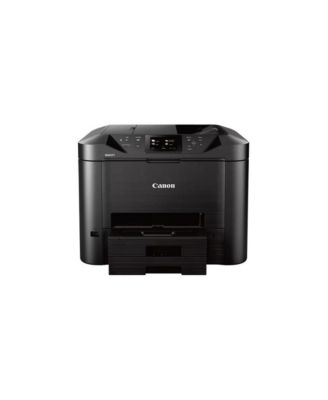
MAXIFY MB5420 Wireless Small Office All-in-One Inkjet Printer
This item is unavailable

MAXIFY MB5420 Wireless Small Office All-in-One Inkjet Printer

Still curious? Here’s a closer look

MAXIFY MB5420 Wireless Small Office All-in-One Inkjet Printer

Product details

Web ID: 18733145

The Canon MAXIFY MB5420 Wireless Small Office All-In-One Printer is designed to meet the needs of smaller businesses with up to nine users, by delivering high-quality, low-cost prints. This set contains Canon MAXIFY MB5420 Wireless Small Office All-in-One Inkjet Printer, Setup CD-ROM, Full Set of PGI-2200 Inks (C,M,Y,BK), Power Cord, Telephone Line Cable, and Limited 1-Year Warranty.

  • Product Features

    • Power through paperwork with single-pass duplex scanning which simultaneously scans both sides of two-sided documents, enabling fast multi-page copying and scanning.
    • The MB5420 is built for big jobs with a 500 sheet paper tray capacity, and a high page yield of 2500 B and W/1500 color prints when using XL ink tanks.
    • Always stay connected and informed with built-in standard Management Information Base (MIB) support, which allows you to easily manage the MAXIFY printers on your network.
    • Built-in Wi-Fi2 networking makes it easy to connect and print from your computer and favorite mobile devices, and with the Canon PRINT app3, you have the added features of being able to print from the cloud and scan directly to your mobile device.
    • Best of all, the eco-friendly MB5420 printer is backed by 100% U.S.-based customer service and support.
    • Wipe clean
    • Imported
    • Request warranty information
  • Shipping & Returns

    • This item qualifies for Free Shipping with minimum purchase! exclusions & details
    • Our Normal Gift Boxing is not available for this item.
    • This item may not be shipped to Marshall Islands, Guam, Puerto Rico, American Samoa, Northern Mariana, U.S. Virgin Islands, Alaska, Hawaii, Federated States of Micronesia, Palau
    • This item may not be shipped to Alaska, American Samoa, Guam, Hawaii, Marshall Islands, U.S. Virgin Islands, Puerto Rico, Palau, or the Pacific Islands.
    • California and Minnesota customers call 1-800-289-6229 for Free Shipping information.
    • For complete details, see our Shipping and Returns policies.

Ratings & Reviews

Here's what customers think
  • The printer offers excellent print quality, fast speeds, and user-friendly features like wireless connectivity, multi-function capabilities, and an intuitive touchscreen interface.
  • Customers appreciate the large paper capacity, automatic double-sided printing, and easy setup.
  • Some users have experienced issues with the printer going into error mode when the first paper tray is empty, as well as concerns about energy consumption and cost per print, especially for color printing.
  • Overall, the printer is viewed as a high-quality, feature-rich option well-suited for home and small office use.
AI-generated summary from 64 customers reviews.

3.9/5

64 star ratings & reviews

Write a Review
35
11
5
5
8

2 customer images

64 reviewssorted by Newest

Sandie167
2 months ago
from Central Texas

A good combo printer/scanner

A great 3-1 combo. The fax function now becoming obsolete with communications by cell rather than landline. Crisp printing in color and black & white. Do love this printer.

Recommends this product

Customer review from canon.com

goldstein
5 months ago
from dallas, tx

many issues with this new printer; must turn on&off before each use

probably so much better equipment than this machine

Customer review from canon.com

RayJ
2 years ago
from Reno

Great Printer

A wonderful product with excellent tech support. Thanks

Customer review from canon.com

Raemey
2 years ago
from Colorado Springs, CO

Keep Ken

Ken was wonderfully patient, kind, and professional.

Recommends this product

Customer review from canon.com

SteveIzHere
2 years ago
from New York

Quality of Tech Support

This is the second tech agent that couldn't help me with the OCR software that is included with my Canon Printer. I felt like the two issues I had were not taking seriously. I'm very disappointed with Tech Support.

Customer review from canon.com

Joe cert
3 years ago
from Tenn

Old software no longer works

While the printer has held up software that ties it to devices has not been updated. It no longer prints from android because the CA certificate self signed for the device is not acceptable to Android devices when installed . Even manually installed. The encryption of the self signed cert is too old.

Customer review from canon.com

AXTrini
3 years ago

No Parts can be purchased for this printer! DO NOT BUY!!!

I own a MB5420, it's just over one year old. The logic board just went in the printer and CANON just told me that they don't sell the parts for this printer even though they are still making and selling the printer!! I used to be a big CANON fan!! NO MORE!!!

Customer review from canon.com

Allan17
4 years ago
from Massachusetts

One Major Flaw

Overall, I'm happy with the printer. It does a nice job scanning documents and pictures and does a good job printing documents. It does have one major flaw, however, It does not have a setting for printing in draft mode. The only options are high and standard. I am a writer and prefer to print my drafts in draft mode to save ink. If I had known this did not have a draft mode I would not have bought it.

Customer review from canon.com