
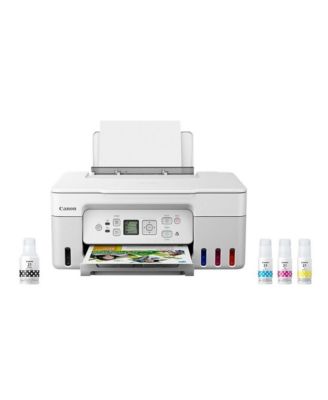
CanonPIXMA G3270 MegaTank All-in-One Wireless Inkjet Color Printer (White)
CanonPIXMA G3270 MegaTank All-in-One Wireless Inkjet Color Printer (White)
Product details
Web ID: 1914878262 reviewssorted by Newest
Second Printer just as good as our first
This is the second Canon Megatank printer we purchased. Happy with both of them. Efficient use of ink, very high quality prints (plain paper or photo paper. Easy to use and easy to set up. footprint on the table is excellent.
Recommends this product
Customer review from canon.com
The ink tank is big
I was so excited for my next throw away printer not to run out of ink after a hundred or less black and white low quality pages. My last 5 printers use colored and black ink so fast. The mega tank was a great idea! however the printer doesn't "want" to connect to any of my devices. When I print (about 20 pages a week in my small office) it takes 10 to 20 minutes. no spinning circle, no "printing in progress", nothing. I turn it off and on daily. Scanning is easier to drive to a print shop, or drop off a copy. That is one thing it does well on command- copying a black and white page. I have tried everything suggested on all the other posts trying to keep this thing connected. I give up.
Customer review from canon.com
G3270 Mega Tank Frustrated with the color
G3270 Mega Tank. Only had this printer for two weeks. When I first set it up I was able to print from my computer. I've battled with it and am very frustrated. I wanted a printer that would print as is and it doesn't. Color images from the start have been weak and not satisfactory. I'm a Professional Photographer and expect better and easier from Canon. All of my cameras are Canon.
Customer review from canon.com
Not worth the money
Purchased this printer in December of 2024. I just gave the thing away for free because it virtually never worked. It worked alright until I have to change my WiFi password, then I was never able to get the thing to work consistently again, even when I tried to hardwire it to my PC. The printer was connected to the WiFi after that but simply would not ever print anything. The queue would have the jobs in it but the printer would never respond. I printed probably about 100 pages with the printer and in that time spent about 10-12 hours of troubleshooting, diagnosing and contacting Canon to no avail.
Customer review from canon.com
Terrible
Aggravating. This was suppose to be better than the Cannon Pixima 3260. I have no idea Why it was discontinued. when the color accuracy doesnt match.
Customer review from canon.com
This is a compact, quiet printer.
The bonus is that Canon service is the best in the field. A larger screen for messages would have been worth a few more bucks.
Recommends this product
Customer review from canon.com
Canon G3270 printer
PIXMA G3270 ALL IN ONE PRINTER I am happy with this printer except for the print after scan feature. Having to save the scan to a file on the computer to be able to print. With my old Canon printer I could scan and print without involving the computer.
Customer review from canon.com
great for simple tasks not for more complex images or projects
ive had for months, I do a variety of projects. All of my prints with black ink on glossy or Matte paper began to have a running purple outline, ive changed paper bands, and it wasn't as bad. I wouldn't recommend as it's very inconvenient. if you aren't doing a variety of projects Id say its decent
Customer review from canon.com