
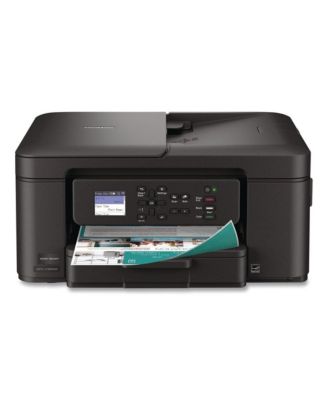
BrotherMFCJ1360DW Work Smart 1360 Copy/Print/Scan Wireless Color Inkjet AIO Printer
Product details
Web ID: 2530084615 reviewssorted by Newest
Forces you to buy colored ink.
Beware: The printer won't let you print anything in black and white if you run out of any of the other colors. That mean if you're out of yellow ink, you can print ANYTHING until you buy more yellow ink. It's a complete scam and I'm furious at the blatant attempt to force people to buy more of their expensive ink. Pick a different brand.
Customer review from brother-usa.com
Response from brother-usa.com
I’m sorry to hear your experience with the Brother inks for Brother MFC-J1360DW. If you’ll give us another chance, we’d like to make things right. Please contact us directly at: https://www.brother-usa.com/support
I should have stayed with HP
Cannot get it to hook up. Brother support cannot find the printer. I search for MFC-J1360DW and nothing ?
Customer review from brother-usa.com
Response from brother-usa.com
Thanks for taking the time to review your experience with the Brother MFCJ1360DW. We appreciate your feedback. I’m sorry to hear about your experience with Brother Customer Service. If you’ll give us another chance, we’d like to make things right. I’m sorry to hear that you are having connection issues with the Brother MFCJ1360DW. Please contact us directly at: https://www.brother-usa.com/support/MFCJ1360DW
Wobbly cord
Cord doesnt stay in printer. Very loose and wobbly. I would have simply replaced the cord if you had that option. Im having to replace the whole unit.
Customer review from brother-usa.com
Response from brother-usa.com
Thanks for taking the time to review your experience with the Brother MFCJ1360DW. We appreciate your feedback. I’m sorry to hear that you are having power cord issues with the Brother MFCJ1360DW. I sincerely apologize for any inconvenience this issue may have caused you. We would love to hear from you in order to be able to better assist you. Our Brother Customer Support Team is available to assist you direct: www.brother-usa.com/brother-support/MFCJ1360DW
Not a friend of Apple computer
Finally after ordering this printer on 12/31/25, it successfully spit out a print alignment test on the night of 01/13/26. It is a fine machine - doing all I need it to do. But it's almost impossible to set up without a cell phone WITH a SCANNER. Even the guide that came with it, implied that it may not play nicely with an Apple computer and another working printer would be needed to read step-by-step instructions to install. In the final analysis, it may not be worth the stress for Apple owners.
Customer review from brother-usa.com
Response from brother-usa.com
Thanks for taking the time to review your experience with the Brother MFCJ1360DW. We appreciate your feedback. I’m sorry to hear that you are having installation issues with the Brother MFC-J1360DW. I sincerely apologize for any inconvenience this issue may have caused you. We can help with that. I have included a link to the FAQ answer that should assist you. Please follow all the steps listed in the following link: Answer Link: https://help.brother-usa.com/app/answers/detail/a_id/189037 Answer Link: https://help.brother-usa.com/app/answers/detail/a_id/185118 Answer Link: https://help.brother-usa.com/app/answers/detail/a_id/185179 If you still have difficulties, please contact Brother Customer Service at: https://www.brother-usa.com/support/MFCJ1360DW
The 1.8 inch display screen is small and difficult to read. The print quality is good. The instructions are not very clear. The printer works good but the set up is difficult.
Customer review from brother-usa.com
Response from brother-usa.com
Thanks for taking the time to review your experience with the Brother MFCJ1360DW. We appreciate your feedback. If you still need assistance, please contact the Brother USA support team at: https://www.brother-usa.com/support
Far from Simple Home Computer
Extremely difficult to connect printer to my Dell PC. Actually paid tech service to try to connect the printer to the PC and they couldn't. Brothers is precise when requiring software or computer cable but leaves you in the dark of the precise software or cable hook up. I had Epson for more than 10 years with almost no issues. I was hoping Brother printer would be the same.
Customer review from brother-usa.com
Response from brother-usa.com
Thanks for taking the time to review your experience with the Brother MFCJ1360DW. We appreciate your feedback. I’m sorry to hear that you are having connectivity issues with the Brother MFCJ1360DW. I sincerely apologize for any inconvenience this issue may have caused you. We’d like an opportunity to help. Please contact us directly at: https://www.brother-usa.com/support/MFCJ1360DW
Love this machine!
I love the printer! Its easy to setup and use. I can use my phone to print!!! Prints fast and handles the paper great. I will definitely purchase brothers again
Customer review from influenster.com
Horrible - Don't waste your money
This is the worst at-home printer I've ever had in over 30 years of practice. The procedure to connect it to the internet is convoluted and I still cannot get it connected to my iphone via wireless, although it is at least connected to my laptop. Nothing in the controls is intuitive and trying to find answers either on the Brother website or, in desperation, Google. It frequently displays an error message instead of printing and I have to unplug it. This is a waste of money and when I use up the ink cartridges, I'm junking it.
Customer review from brother-usa.com
Response from brother-usa.com
We are sorry for the experience you are having with your Brother MFCJ1360DW getting it connected to the network and also your devices. If you’ll give us another chance, we’d like to make things right. Please contact us directly at: https://www.brother-usa.com/support