
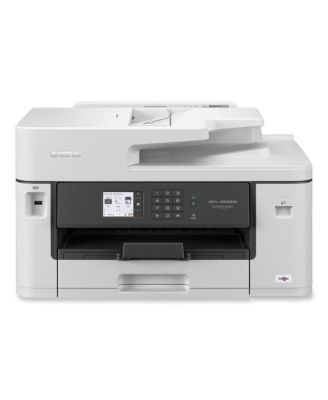
BrotherMFCJ5340DW Business All-in-One Color Inkjet Printer
BrotherMFCJ5340DW Business All-in-One Color Inkjet Printer
Product details
Web ID: 2637558641 reviewssorted by Newest
Great
Still learning all the "bells & whistles, but this machine is great!
Customer review from brother-usa.com
I Had to Hire an IT person to Help Install it :(
In the 1990s and 2000s, when you bought a printer, it was plug and play. You simply plugged it in, and it downloaded the drivers. Within minutes you were ready to work. I realize technology now is more complicated, and we usually want to connect wirelessly, but the installation for this machine is completely ridiculous. I had to pay an IT person just to help install this printer because the instructions didn't work (and I don't any any unusual equipment: just a Dell laptop and an older desktop on a network), and it was after Brother's normal hours. How crazy is that? Now, after all that, I find that the machine won't scan. It says that the scanner driver wasn't installed. Huh? So I'm dead in the water with a brand new printer sitting on the desk behind me. I suppose I'll have to spend another hour or more either with Brother CS or an IT person to figure out what's wrong. Again, I've installed COUNTLESS printers. Technology should make things EASIER for the customer, not more complicated...but it's not going that direction. Then there's this whole matter of having to find a password or serial number on the BACK of the machine. It's like no one even in 2026 considers accessibility. I can hardly express my disappointment and frustration. I wish I could simply return this product. I really don't want to purchase another Brother printer..EVER...but I'm not sure the competition is any better.
Customer review from brother-usa.com
Response from brother-usa.com
Thanks for taking the time to review your experience with the Brother MFCJ5340DW. We appreciate your feedback. I’m sorry to hear that you are having some issues with the Brother MFCJ5340DW. We sincerely apologize for any inconvenience this issue may have caused you. We’d like an opportunity to help. Please contact us directly at: https://www.brother-usa.com/support/MFCJ5340DW
Great
Very excelent and profesional printers, I likes all
Customer review from brother-usa.com
Speed, Efficiency, Quality. All top notch.
So fast and great quality. I love this printer. I have a small business and it’s perfect.
Customer review from brother-usa.com
Switching from many HP disappointments
So far so good. I've had nothing but trouble with hp printers and service. This is my 1st brother. Easy setup, fair price and good quality print. Haven't had to replace ink cartridges from what it came with yet. Only complaint is that I can't print from my chromebook. I'm printing from my smart phone instead. I'm a frequent printer for my work (50+ color pages per month). Did lots of research before i chose this one about 4 months ago. So far so good!
Customer review from brother-usa.com
It’s great! And a great price.
Great Printer. Fast printing. Prints front and back. The best. Great deal too!
Customer review from brother-usa.com
Great performance.
So far it is as good of a printer as my laser jet. It is much better in performance than other brands too.
Customer review from brother-usa.com
Scan software subpar.
The scan option does not contain a .docx option like the 6920 model. Why give poor software out for your lower models?
Customer review from brother-usa.com
Response from brother-usa.com
I’m sorry to hear the scanning software didn’t meet your expectations. The MFC‑J5340DW supports scanning to formats like PDF and image files, but .docx output depends on OCR software used during scanning. Some advanced models include built‑in OCR features that allow formats like .docx. Thank you for the feedback. If you need help with scan settings or OCR options, please contact Brother Support: https://www.brother-usa.com/support