
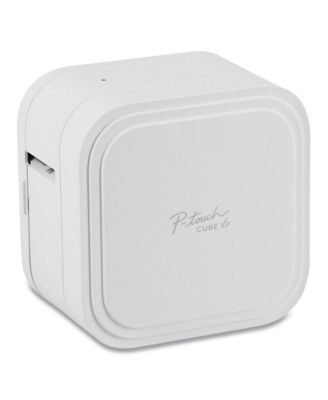
Brother P-TouchPT-P910BT P-Touch CUBE XP 3.7 in. x 5.4 in. x 5.4 in. 20 mm/s Print Speed Label Maker
Product details
Web ID: 2686615516 reviewssorted by Newest
Conference Registration Team Lifesaver
This product has been a game changer for our registration team. It is sleek takes up less space, does not need to be plugged in. It works with our computers, phones and ipads. We are able to create name badges quickly and efficiently.
Customer review from brother-usa.com
Works but confusing
The product works...once you figure it out. Brother user instructions are opaque..but that's not new. This product tries to solve too many problems and comes off as overkill for the job at hand. The biggest complaint is the labels are not centered...and there seems to be no way to fix that.
Customer review from brother-usa.com
Response from brother-usa.com
We understand you're experiencing issues adjusting the alignment to center the text on the labels for your Brother PTP910BT machine. We'd like to help. Please contact our Customer Service department and we will work with you to resolve this issue. Brother Customer Support Team is available to assist you direct: www.brother-usa.com/brother-support
the printer is great, the app is NOT
i choose this printer for work, and it was a let down because there is no support behind it, and some bugs could be easily resolve. first one: PRINTING ISSUE the print is not vertically center, there is more space above text than below...why? I can fill the whole tape with ink, so why can't I center my words? (Again vertically, since we can horizontally) Second: Limitation of number of images I can print in one go There is absolutely no reason for that, i can't put more than 2 image per print? this is not 1990, I have a phone that could power all of Nasa when then ship the entire Apollo program, and yet you tell me I can't use more than 2 images… this is madness third one: no QR code or BAR CODE maker, In 2022 you still haven't implemented a way to make those code? i have to use another app, save it as an image, then use that image...and again i am limited with 2 images…this is nerve-racking. fourth : there is no folder on my phone where my designs are saved, so when i had to do a factory setting on my phone, even with data being backup i lost everything. five : still no touch screen to place the element where i want them to be Again, it is 2022, you got a good product but you app was made for windows 3.1, it is like someone took “office words” and decided that the image feature where when you move it it mess everything should be the foundation of this app. six: multiple cuts, You should have an option when we make more than 5 label to have a cut between our label if we want to, why wasn't this implemented, i have to use a scissor every time between labels. seven: you decided to remove the volontary cut feature from the app, where i could choose by clicking twice on the power button to cut my tape
Customer review from brother-usa.com
brother cube label maker
I received this product for free from Brother in exchange for my honest opinion/review of the product. I found it difficult to connect to my laptop and phone to print labels once I was able to connect to the label maker I like it it printed quickly with different fonts and emojis. I feel they should make it easier to connect it took almost a day to resolve the issues with help from another person. I also like the size since it is so tiny it can fir anywhere and is portable.
Customer review from brother-usa.com
Response from brother-usa.com
Hi, thank you for taking the time to review our Brother PT-P910BT. Your feedback is very important to us. We appreciate your comments, and will be happy to forward the suggestion for future improvements. If we can be of any assistance, please don't hesitate to contact us directly: https://www.brother-usa.com/brother-support
Perfect...
I received this product for free from Brother in exchange for my honest opinion/review of the product. Coming into sampling this unit, I was a bit skeptical. How could something so small print and easy do what I was needing it to. Well, after setting up (which was pretty simple and self explanatory) and then printing my first label, I definitely changed my mind about it. Again, the set up of the unit, loading the tapes and the basic getting ready to print items, are explained perfectly. Then the finished product after all the things you can do with it, are awesome. It`s a must try if you are looking for a sturdy, great printer. It does it all and then some!
Customer review from brother-usa.com
Revolutionary Label Maker
I received this product for free from Brother in exchange for my honest opinion/review of the product. Item: P-touch CUBE XP Label MakerDESIGN: I think this label maker has a very sleek and modernized look. The unit is condensed and fits nicely on my office desk. It is a little on the heavier side (~ 2 lbs.) but I did not see that as a problem.SETUP: The setup is overall very easy. The setup guide that is provide with the label maker is straight forward. I followed the guide and was able to setup the label maker without any hiccups. The label maker can be connected using Bluetooth technology, which enables easy connection to smartphones, tablets, and laptops. USE: After an easy setup experience, using the label maker followed seamlessly. There are three free apps that you can choose from that allows for customization in which you are looking to do. The usage of the apps are smooth. What I liked most while using this device is that I could design my labels at my own convenience using my mobile device. This unit`s technology allowed for easy accessibility. ISSUES: I did not come across any major issues. The only thing that I had trouble with was figuring out the half-cut verse full cut feature.PRICE: Although the price is on the higher side compared to most label makers out on the market, you get what you pay for. The technology and features built into this label marker justifies the price in my opinion.
Customer review from brother-usa.com
Happy Labeler
I received this product for free from Brother in exchange for my honest opinion/review of the product. Excited to start using P-touch Cube. My current labeler is hand held and only prints one line. Unboxing I quickly found instructions. Took only a few minutes to read and set up. Instructions did not specify how long I had to charge the unit and some of the drawinga were printed so faintly it was hard to figure them out. I let it charge 2 hrs. The cube is larger than I thought it would be and does not have any handles or indentions to make it easy to grab onto when moving. I almost dropped it once. Ergonomically it needs improvement.Once charged I proceeded to download the app to my android phone. Easy. I them followed the instructions on how to create and print a label. 1st few attempts did not work so I uninstalled app and then reinstalled. Trouble was getting the bluetooth to work. I decided to make labels for my tax files. I used 1 1/4 inch tape and I noticed that when I changed the size of the font it would frequently reset itself back to the default size. I had to keep resetting it. A little annoying. I liked being able to print multiple lines on my labels. Also your last label stays in the printer so you have to create an extra one to get your last label. It also prints borders around labels and has an additional app that includes graphics if desired. Overall I liked being able to create labels from my phone and wirelessly print them. The cube has some quirks but the quality of the labels and convenience make up for it. I would give it a must Buy.
Customer review from brother-usa.com
IT’S UNIQUELY STRANGE LOOKING MACHINE 👍
Purchased this unique label maker a few weeks ago. Primarily to make 1.5” labels. I have 2 other conventional Brother label makers for regular size labels. I’ve read some critical reviews about this PT-P910BT labelmaker. It is excellent‼️The app for it is a little awkward, however it does require a little effort at first! The finished labels it creates are PERFECT‼️ In fact all 3 of these label makers do an outstanding job. I couldn’t be more pleased.
Customer review from brother-usa.com