
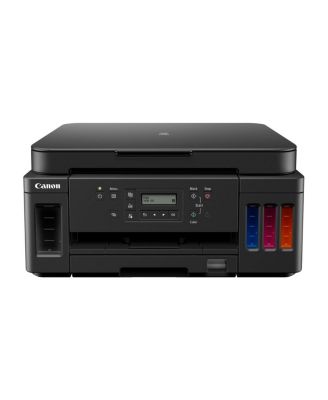
CanonPIXMA G6020 Wireless Mega Tank All-in-One Printer
Product details
Web ID: 17564897If you're not going to use this every week get a different printer
I've had this printer for a couple years now and for my purposes it's pretty hit or miss. If you're printing often (multiple times a week) then you should have no issues, however I needed a high quality printer that would be used very sparingly and I print things maybe every month or less often and the ink cartridges on this thing looooove to clog up and not print correctly. When it's an issue with the color (magenta didn't print at all even with a full tank) I had to do two full deep cleanings to fix it. This is half the storage amount of ink so it's extremely costly. The amount I'm not paying in cartridges is made up by me needing to buy more bottles just to make sure this thing prints correctly. I printed in black and white a week ago and my printer refused to print any black today. I went through 8 rounds of regular cleanings to get the nozzle check to come back correct. If you're not using this thing every day it really gives up and does not work well. If you're using it more often it's a great machine.
Customer review from canon.com
LOVE this printer!
I can't imagine having a printer that does NOT print double sided. I don't consider me taking the paper and putting it back in the tray to print the other side 'double sided' printing. THIS printer prints both sides without you having to touch the paper at all. Not only that, but this printer WILL connect easily to a Google Chromebook!! I can print right from my Chromebook without having to use my actual PC. It has large tanks so I don't have to worry about replacing cartridges. It has a front AND back loading tray and the front tray will hold 250 sheets, which is 1/2 of a ream. I can't love this printer enough!
Recommends this product
Customer review from canon.com
Better of lighting your money of fire!
Finally tried a cannon printer for my home. My experience with this one has caused me to never want to use the brand again. It works less than 1/2 the time and often requires 20 minutes or more of tinkering to be able to print. This shouldn't even be sold it's junk. My guess is, they'll never post this message because they know it.
Customer review from canon.com
TERRIBLE
its absolute garbage. Ive been struggling with it since I got it and I assumed it was normal printer hate but this was something different. Everytime and I mean everytime, I tried to print I would run into a DIFFERENT issue each time. And the support for this product is also terrible, every solution was just "press this button on the printer" and no other solution, which never worked anyways.
Customer review from canon.com
Best Printer I've Had
I've had this printer longer than five years and it has performed brilliantly without ever disappointing. The print quality is great. The scanning is easy. The self-cleaning features really work. We recently moved and one of the men unloading the truck dropped the box the printer was in and damaged the paper tray. When it's time to replace the printer, I'll most like get the exact same model. It's that good!
Recommends this product
Customer review from canon.com
Worst printer
As of today I have a little more than 50% tank of black ink and between 50% and 75% on each of the colors from the original installation. The printer has stopped printing. Completely. It does not even print what I just scanned on the printer bed.
Customer review from canon.com
Better options for the same price
ive had this printer for awhile now and at first i thought it was great. Now a bit over a year out and the thing is just dead. For some reason the color printing is all messed up and not working correctly. I’ve tried all the cleaning options, ran test pages, flooded the nozzles. Absolutely nothing seems to fix this clog, or whatever is going on. Really disappointed because I’m not even halfway to finishing the ink in the tanks and have spare bottles of ink as well. Kind of annoying that obviously better printers seem to be available for the same price range with better capabilities and better specs. Cant even resell the thing to recoup some money since its just broken junk now
Customer review from canon.com
Great Consistent Printer
I have had this printer for over a year, and it is connected to my Wi-Fi. At first, it worked smoothly. I thoroughly enjoy the tanks that refill with ink bottles. I moved my printer to a different room in my house and began having connection issues. I thought maybe it was due to a poor Wi-Fi connection. I moved my router closer, but I still had issues. I then checked for updated drivers and found the Wi-Fi Assist tool on the HP website. I followed the software's instructions exactly, and now my printer is printing fast and smoothly again. I haven't had any issues since. I have been a true Canon fan for decades, and this printer shows its true solidity.
Recommends this product
Customer review from canon.com