
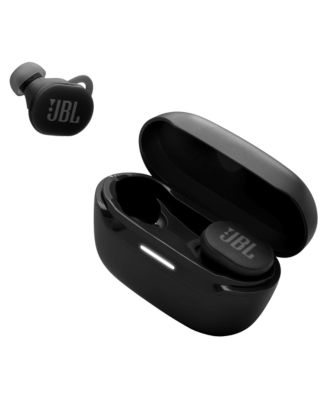
JBLEndurance Race 2 True Wireless Active Earbuds
Product details
Web ID: 2425578481 reviewssorted by Newest
Great sound & a cool royal blue color
I've gone thru several earbuds & Finally I found the perfect one for running in the hot Florida weather without worrying of them falling off because of sweat.5 starts!!
Customer review from jbl.com
Great headphones
I have had these a couple months now and love them. They actually stay in your ear while moving; I completed a half marathon without even thinking about it. About a week ago, they went through the washer and dryer by accident and work exactly the same. Fantastic!
Customer review from jbl.com
Disconnects Bluetooth
The charge lasts for a time, they stay in ear perfectly, if it weren't for the fact that they dont keep connected, they would be perfect. About every hour or 2 they disconnect from Bluetooth and reconnect 1 minute or so later if I dont push for it to connect faster
Customer review from jbl.com
Good sounds but wouldn’t recommend for safety reas
I had bought these a month ago and today 5/23/2026 I tried to charge them so I left them charging for 10 mins to use them a bit saw the charger and the case with the buds in it all melted
Customer review from jbl.com
Response from jbl.com
Thank you for bringing this to our attention. We understand how important this is for you and we would like to know more about your concern. Please expect an email from our customer support for further assistance. We look forward to your reply.
Good Sound, But a Step Back From the Original
Although I enjoy the sound quality and battery life, I think the first version of these headphones was far superior. These do feel lighter than the previous version, which is nice, but the seal on the earbuds is not as tight, so sound leaks out more easily. The biggest flaw is that the left earbud disconnects randomly—especially in the middle of a run—and the only way to fix it is to place it back in the case and reconnect it. If these issues were resolved, this would have been a great step forward. Unfortunately, I believe these headphones took two steps back.
Customer review from jbl.com
Response from jbl.com
Thanks for bringing this to our attention. Bluetooth performs well within a 30-foot range, but walls, obstacles, and other wireless devices can impede this. If you experience dropouts within 10 feet, there may be interference. To resolve the issue with your JBL Endurance Race, ensure it is within 10 feet of your device with a clear line of sight (no obstacles). Try to forget/unpair the speaker on your device and initiate a reset. To reset your unit, first make sure that the earbuds are not charging, tap both buds' sensor twice and hold it on the third tap for more than 5 seconds. Reset will wipe all previous settings and pairings, so it will be necessary to pair your unit with your devices again. Lastly, try to connect the earbuds to a different device to determine if the issue lies with the earbuds or the initial device you paired them with. If you need more help, please contact us our customer support.
disappointing "ear lock" design
My wife bought these for me knowing I was looking for something to use while running or lifting weights that wouldn't come loose. I dont like the bulky headsets, and these airbuds are positioned as a wireless. option that "locks in" to your ear for stability. Unfortunately I have found that any kind of movement just rattles them loose. I am frequently picking them up off the gym floor or from the street when on a run. Any little tilt of the head causes them to come out of position. Maybe it is the shape or size of my ears but I've tried switching out the 3 different sized rubber pads and it never made any difference. Just fluff. They are more of a distraction than anything, as I am constantly readjusting them or trying to prevent them from falling out in the middle of a set. Even today all I did was a brisk walk and they need so much attention. I'm fed up. Pretty disappointing, as I do otherwise respect the brand for sound quality and durability. The sound quality is fine but as far as functionality and practicality for an athletic user, these are a no-go.
Customer review from jbl.com
Response from jbl.com
Thanks for sharing your feedback on our JBL Endurance Race 2 TWS. You can create a tight seal by inserting the eartip at a slight downward angle, gently twisting the earbud to match the shape of your ear, and continuing to twist until it feels secure. Try this with each of the included eartip sizes to find the best fit. After a few attempts, the process becomes quick and easy each time you put them on. We'll also make sure to share your feedback with the appropriate team. If you need more help with your unit, please contact our customer support via our official website or toll-free hotline.
Do not recommend
I bought these headphones a couple months ago and while the sound quality is great and they stay in my ears for even the hard workouts the DO NOT shut off and stay off. They say "power off" when i turn them off and then the second they are back in the case they turn right back on. I cannot even walk past my gym bag they stay in without them connecting to my phone this causes great annoyance especially when on phone calls. The fact that they dont turn off basically ever also means the battery does not stay charged at all. It is ridiculous. I would not recommend this model and I regret purchasing this model myself. I have had other JBL brand headphones and they do not have this issue. Go with a different model.
Customer review from jbl.com
Response from jbl.com
Thanks for bringing this to our attention. It appears the earbuds may be losing contact with the charging pins, causing them to turn on while inside the case. We recommend cleaning the charging pins and contact points with a cotton swab and a small amount of rubbing alcohol to remove any dirt or debris. If the issue persists after troubleshooting, please contact us directly to file a warranty claim here: https://support.jbl.com/us/en/#contact
Earpieces is too small
I purchased these endurance rush 2 rear buds last month and although the sound is great; the earbuds won't stay in my ears. I have swapped through all the earpieces, changed the earlobe piece but I'm not about to run with them In my ears.
Customer review from jbl.com
Response from jbl.com
In order for our JBL Endurance Race 2 to fit in your ears, you must create a tight seal within your ear canal. Angle the eartip slightly downward to make it easier to insert into your ear canal. Gently twist the earbud to fit it securely into the shape of your ear. Continue adjusting the earbud into your ear canal to achieve the best seal and secure fit. It is also best to try this with all of the provided eartip sizes, until you find the one that accomplishes this most easily. You may contact our customer support for further assistance. https://support.jbl.com/