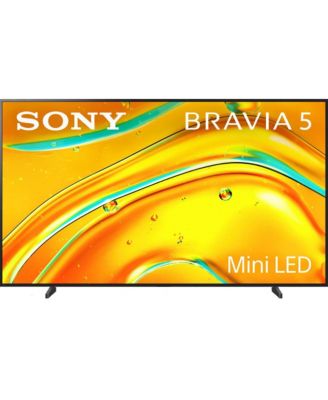
98" LED 4K HDR Google TV

Shipped and sold by Walts TV
4.4 (51)
$4,998.00
Color:Black
Size:No Size

Product details

Web ID: 23170382
Experience cinematic brilliance at home with the TV powered by the intelligent XR Processor. Featuring XR Backlight Master Drive and XR Contrast Booster, it delivers incredible brightness, deep blacks, and stunning contrast. Billions of lifelike colors come to life with XR Triluminos Pro, while XR Clear Image and AI Super Resolution upscale content to near-4K clarity. Dolby Vision, Dolby Atmos, and IMAX Enhanced provide a theater-worthy viewing and listening experience. Game Menu puts custom settings at your fingertips, while Google TV organizes your favorite apps and shows in one easy interface. Studio Calibrated Modes adjust visuals based on your environment, so every frame stays true to the creator s vision. Effortlessly stream with AirPlay 2 or Google Cast and control your TV with built-in voice assistants. With Kids Profiles and BRAVIA Connect app support, this TV is smart, powerful, and made for every member of the family.
  • Product Features

    • 4 k HDR Google TV , Cinematic Quality: XR Processor delivers true-to-life clarity, contrast and color.
    • Resolution upscale content to near-4K clarity, Next-Level Brightness: XR Backlight Master Drive enhances darks and highlights
    • Immersive Audio and Visuals: Dolby Atmos, Dolby Vision, and IMAX Enhanced support.
    • Screen size : 98", Display type : LED, Smart Streaming: Google TV with 700,000+ movies and shows across 10,000+ apps.
    • Ultimate Gaming Edge: Game Menu, Black Equalizer and up to 4K upscaling for precision play.
    • Made in USA
  • Product Dimensions

    • 92 x 12 x 55 inches
    • 208.00
  • Shipping & Returns

    • This item qualifies for Free Shipping with minimum purchase! exclusions & details
    • Orders will not ship in Macy’s packaging.
    • This item may not be shipped to Alaska, American Samoa, Guam, Hawaii, Marshall Islands, U.S. Virgin Islands, Puerto Rico, Palau, or the Pacific Islands.
    • A carrier will contact you to schedule delivery
    • Contact the seller directly to return this item
    • Item is not eligible for in-store returns
    • Must contact seller within 30 days to initiate a return. All items must be fully disassembled and securely repackaged in their original packaging or equivalent protective materials.
    • California and Minnesota customers call 1-800-289-6229 for Free Shipping information.
    • For complete details, see our Shipping and Returns policies.
    Your security is our number one concern.

    To report suspicious activity, please reach out to Macy's at 1-800-289-6229 or click here to report online.

Ratings & Reviews

4.4/5

51 star ratings & reviews

Write a Review
68.6% of reviews have 5 stars
35
17.6% of reviews have 4 stars
9
2.0% of reviews have 3 stars
1
9.8% of reviews have 2 stars
5
2.0% of reviews have 1 star
1

16 customer images

51 reviews
Fedor197
8 days ago

Good TV

Great picture quality, ok sound, but google tv system slow, way to complicated and not user friendly.

Recommends this product

Customer review from sony.com

Response from sony.com

Sony support team5 days ago

Hi, Thank you for your feedback. We’re happy to hear that you're enjoying the picture quality of your K-55XR5. Yet, we're sorry to learn that the Google TV system is slow; this is not the norm, as we strive to deliver the best quality possible. Please follow the below steps: 1. Disconnect all the external devices from the TV. 2. Unplug the TV from the mains and leave it for 1 minute and then plug it back. 3. Update your software by following the steps at this link: https://cutt.ly/ltfAr7ni 4- Perform factory data reset by following the steps at this link: https://cutt.ly/jtfAtDQe And you can also use the following link to help you with the initial setup afterwards: https://cutt.ly/SrcuhqKd Alternatively, you can set up the TV as a basic TV instead of a Google TV by following the steps here: https://cutt.ly/JtfAyckv If you need any further assistance, do not hesitate to contact us using the details provided in the following link: https://cutt.ly/heoRCkdW (Copy and paste the link into your browser) Nadine @Sony Support UK

neip
11 days ago

Great upgrade

Purchased this 65 inch model to replace a previous Sony TV that was old. This new model was wall mounted.

Recommends this product

Customer review from sony.com

Daimo
13 days ago

Dark picture for 2025 model

Good TV, but the picture is dark compare to previous models. I had to put it on the highest picture settings because standart one is too dark for me. I am a bit disappointed with this model. 10 years old sony tv has much brighter picture than 2025 model, this is a joke.

Customer review from sony.com

Response from sony.com

Sony support team6 days ago

Hi, Thank you for your feedback. We’re sorry to hear that the picture quality of your K-75XR5 didn't meet your expectations. This is certainly not the experience we aim to provide, as we continuously strive to deliver the best possible quality. You can learn more about how to adjust the picture settings to match your preferences by following the steps at this link: https://cutt.ly/mtfcn5iR If you need any further assistance, do not hesitate to contact us using the details provided in the following link: https://cutt.ly/heoRCkdW (Copy and paste the link into your browser) Nadine @Sony Support UK

Gazz76
15 days ago

Excellent picture quality

Excellent picture quality and easy to set up if you are computer literate.

Customer review from sony.com

Blue Eagle
17 days ago

Strong LED TV

This has been in use for around 2 weeks now and is an excellent TV. Very easy to set up and get running with SkyStream and the in built apps. As with all LED based screens image quality deteriorates as you move to an angle versus the screen, but it is less noticeable than on other manufacturers, It is not an issue for us as this tV is being used in a straight on viewing position, One slight annoyance is that the slimline RC isn't illuminated as on our OLED Sony, plus using the Sonos soundbar there is no volume change indication on screen (again unlike the OLED TV in the other room). Overall - great value for money, great quality as always from Sony and recommended.

Recommends this product

Customer review from sony.com

Dell 39
17 days ago

Just the best.

Great tv best I’ve had picture superb as I would expect from Sony quality thanks.

Customer review from sony.com

Liz51
18 days ago

Great picture and features

I am happy with this product. The remote was fiddly when setting up the tv, easy to hit the wrong button, otherwise very nice.

Recommends this product

Customer review from sony.com

Response from sony.com

Sony UK5 days ago

Hi, Thank you for your feedback. We are happy to hear that you are enjoying your K-55XR5, and happy with the quality we always aim to deliver! We hope you continue to enjoy it for years to come! Additionally, we appreciate your feedback regarding the remote control; hearing from our customers helps us continuously improve our products to align with your preferences. Rest assured that we've raised it to the concerned team for future consideration. Furthermore, if any further assistance is needed, feel free to contact us using this link: https://cutt.ly/heoRCkdW (Copy and paste the link in your browser). Menna @Sony Support UK

Alan100
20 days ago

Good TV

Good TV, Great picture and the up scaling work very well, only issue is the TV program menu (telling you whats on whay channel doesnt work)

Customer review from sony.com

Response from sony.com

Sony UK7 days ago

Hi, Thank you for your feedback. We're happy to hear that you're enjoying your K-55XR5 and happy with the picture quality we always aim to deliver. Yet, we're sorry to learn that you're facing difficulties using the programme guide with your TV. Make sure that your TV is connected to the internet by following the steps here: https://cutt.ly/WtfrGO9V If the issue remains, try the steps below: 1. Disconnect all externals (e.g., Sky box, Ariel cable, HDMI cables, USB, etc.). 2. Unplug the TV from the mains and leave it for 1 minute, and then plug it back in. 3. Make sure the aerial cable is connected securely. 4. Retune the channels without and with the aerial cable by following the steps here: https://cutt.ly/MtfrKmXX 5. Make sure the software is updated using this link: https://cutt.ly/6tfrKZnd 6. In case the issue persists, perform a factory data reset by following the steps here: https://cutt.ly/otfrLsi2 Furthermore, if any further assistance is needed, feel free to contact us using this link: https://cutt.ly/heoRCkdW (Copy and paste the links in your browser). Menna @Sony Support UK