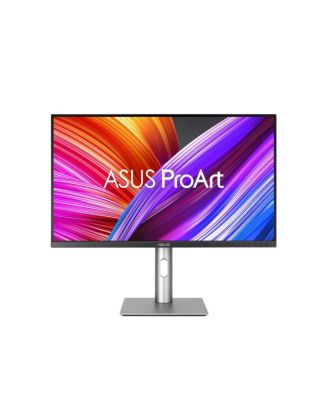
9B24-281-259 32 in. ProArt Display Professional Monitor

Shipped and sold by Adorama
$599.99
Color:Black
Offers & perks
50/mo.* suggested payments for 12-months totaling $599.99 with Macy's Card.

Product details

Web ID: 17478962

Asus ProArt Display 32 inch Professional Monitor PA329CRV- IPS, 4K UHD 3840 x 2160, 98 percent DCI-P3, Color Accuracy Delta E 2, Calman Verified, USB-C PD 96W, Daisy-Chain, VESA DisplayHDR400. ProArt Display PA329CRV is a 31.5-inch 4K HDR monitor designed for professional video editors.

  • Product Features

    • This Calman Verified display boasts a wide color gamut with 98 percent DCI-P3 coverage and is factory pre-calibrated to Delta E 2 for exceptional color accuracy.
    • For added convenience, the built-in USB-C port offers DisplayPort support, superfast data transfers, and 96-watt power via a single cable. Features Wide color gamut with 98 percent DCI-P3 coverage.
    • Enjoyed by many clients.
    • Extensive connectivity including DP over USB-C with 96W Power Delivery, DisplayPort (MST), HDMI and USB hub.
    • Slim profile and smaller base also comes with wall mountable for desk space saving.
    • Wipe clean
    • Imported
  • Product Dimensions

    • 28.70
  • Shipping & Returns

    • This item qualifies for Free Shipping with minimum purchase! exclusions & details
    • Orders will not ship in Macy’s packaging.
    • This item may not be shipped to Alaska, American Samoa, Guam, Hawaii, Marshall Islands, U.S. Virgin Islands, Puerto Rico, Palau, or the Pacific Islands.
    • California and Minnesota customers call 1-800-289-6229 for Free Shipping information.
    • For complete details, see our Shipping and Returns policies.
    Your security is our number one concern.

    To report suspicious activity, please reach out to Macy's at 1-800-289-6229 or click here to report online.

Ratings & Reviews


4.6/5

15 star ratings & reviews

Write a Review
12
1
1
1
0

1 customer image

15 reviewssorted by Newest

Portage Porridge
18 days ago
from Oyster Bed Bridge, Prince Edward Island

Configured as an external monitor to a MacBook Air

I am enjoying this monitor which is operated as an external monitor on my MacBook Air. The only issue I am having is it refuses to wake up without taking extra steps (opening and closing my MacBook numerous times) to wake up. If it was not for this annoying problem I would give this product five stars.

Recommends this product

Customer review from https://www.asus.com

Response from https://www.asus.com

CLM19 days ago

Dear Portage Porridge, Thank you for your comment. We do understand the inconvenience this may have caused if the monitor refuses to wake up without taking extra steps. To resolve this issue, open your monitor's OSD menu, go to Input Select, and switch Auto Detection to Off so it stops sleeping past the signal window, go to System Setup > Power Saving and set it to Normal Level instead of deep sleep modes that cut off USB signal polling, If connected via USB-C, navigate to Settings > DisplayPort Stream and set it to DisplayPort 1.2 to match strict Mac timing requirements. Additionally, ensure you are using a high-bandwith Thunderbolt 4 or a certified USB4 cable capable of steady alternate-mode data flow and disable automatic graphics switching or adjust energy settings in macOS system settings if your MacBook delays re-initializing external video lanes. Should you need further assistance with the product, please email me at cl-rodel@asus.com and I would be more than happy to help. Or, you are most welcome to call Product Support Hotline at: 1(888) 678-3688. Also, you can chat with an ASUS live support agent from the link: https://www.asus.com/us/support/article/1135/. Thank you for choosing an ASUS product. Regards, Rodel ASUS Customer Loyalty

Mr/JB
1 month ago
from ca

Nice monitor but poor firmware/software support

Issues not being able to use the app that controls monitor from computer. spent an hour doing updates, tryhign different cables, etc, it just doesn't work- but all requirements are up to date. can't be wasting my time with something that should work out of the box and have quick easy support if not

Customer review from https://www.asus.com

Response from https://www.asus.com

CLM1 month ago

Dear Mr/JB, Thank you for your comment. We do understand your disappointment with the product and the inconvenience this may have caused if you are experiencing issue controlling the monitor using the ASUS Display Widget Center application. To resolve this, ensure your PC meets the system requirements of the monitor and a compatible and working video cable is being used. If your PC meets requirements, ensure Windows, chipset and video drivers for your PC are up to date. Additonally, download the most current DisplayWidget Center at: https://www.asus.com/us/content/monitor-software-osd-displaywidgetcenter/ . Should you need further assistance with the product, please email me at cl-rodel@asus.com and I would be more than happy to help. Or, you are most welcome to call Product Support Hotline at: 1(888) 678-3688. Also, you can chat with an ASUS live support agent from the link:https://www.asus.com/us/support/article/1135/. Thank you for choosing an ASUS product. Regards, Rodel ASUS Customer Loyalty

External reviewer
4 months ago

Excellent Asus ProArt Display PA329CRV

I am very happy with my purchase, the monitor does excellent color grading with very accurate colors. Easy to set up and use it been a very positive experience.

Customer review from https://www.asus.com

AlainStP
4 months ago
from Montreal, Qc

Awedime

Colors on this monitor are vivid and true. Makes a big difference in photo editing

Customer review from https://www.asus.com

Occulus Rex Media
5 months ago
from Baton Rouge, LA

Big, 4k, and color accurate! It’s heavenly.

I have been using a QHD Asus ProArt monitor for a couple of years, and wanted to upgrade my coloring suite to include a 4k monitor, and the PA329CRV doesn’t disappoint. It is awesome. Being able to see a full resolution timeline in Davinci Resolve has made a huge difference. Now my old 27in ProArt is my Ui monitor, and I have a glorious 32 inch 4k display for my clean feed. The only downside? Now I’m considering upgrading my other monitor too!

Customer review from https://www.asus.com

Jeff Sites
6 months ago
from Lima, OH

New Owner

I've had my Asus ProArt 32" display for about two weeks now. It is sometimes difficult to switch between screens but I love the look. It's a little warm but I still love it. When I get enough money saved I will be buying another one to replace my 32" LG.

Customer review from https://www.asus.com

David Segovia-InterArDis
8 months ago
from Elk Grove CA

great resolution and bright colors

These ASUS monitors are excellent. The clarity and level of detail make my work in Chief Architect so much easier, especially when I'm creating architectural drawings. For me, they’re incredibly useful and comfortable for long hours of work.

Customer review from https://www.asus.com

Joe Red
1 year ago
from Mississauga, ON

A real piece of equipment

Really sharp monitor, my second time owning a 4K, and this one is tops. The colour looks fantastic, and it's a really well-thought-out and sleek piece of equipment. Easy to set up and looks great on my desk. The 32-inch size really makes for a lot of room; I use it with a new Mac mini. A great combo. And all the cables are included. A great deal.

Customer review from https://www.asus.com