
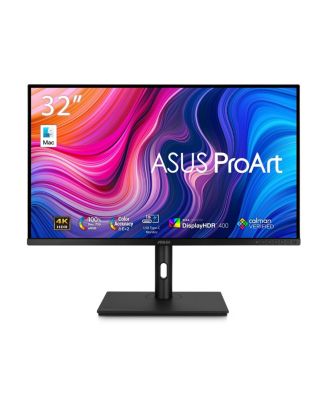
ASUSProArt Display PA329CV 32" 16:9 4K Ultra HD HDR IPS LED Monitor with Built-In-Speakers
Product details
Web ID: 23892841Outstanding performance for the price.
This monitor shipped with a document outlining its actual performance during a calibration test at the factory. I found this to be an accurate representation of the monitor when installed. I am confident that the image displayed is extremely accurate.
Customer review from https://www.asus.com
A Great MAC Monitor!!
Beautiful Monitor, rivals the Apple Mac displays at a fraction of the price.
Customer review from https://www.asus.com
A Fantastic Display For the Creator or Enthusiasts
I have had this display for several months using it for both photo and video editing for our YouTube channels and I love it. The value for the money can't be beat and Asus products have never let me down so far and I have bought quite a few of them. I definitely recommend this display if you want color accuracy and the quality image.
Customer review from ASUS.com
Best graphic design monitor you can buy
Accurate colours, works great for graphic design work. Also works well for programming and coding work
Customer review from ASUS.com
Great 4K Monitor for Photography
Great monitor, this is the latest of 4 Asus monitors and allows me to work on photos in a close to perfect colour space.
Customer review from https://www.asus.com
Well Worth the Investment!
Excellent displays for my photography/design business. Perfectly calibrated and ready to go out of the box. Good quality mounting solution for my desk. Easy to use interface and the monitors design is very nice and clean. For the price these monitors can’t be beat!
Recommends this product
Customer review from https://www.asus.com
Would recommend
I semi-love it. The only gripe I have is the light leakage coming from the left side. Other than that, it is an amazing monitor!
Customer review from https://www.asus.com
A premium monitor at a discounted price.
Overall this is an excellent monitor. Based on other reviews and online research, I chose this monitor for my Mac Mini M4. Setup was simple and the included cables covered almost every possible connection option. I chose to use the USB C cable from the Mac Mini to the monitor which activates the USB ports on the monitor as well. A monitor stand for desktop and a desktop clamp mount were both included. In order to get full speed from the monitor USB ports, I had to do a firmware update on the Mac. This was accomplished with a 4GB flash drive formatted with terminal in MBR format. AI told me how to accomplish the terminal commands for that step. The firmware update was a bit tricky but it did work and the speed of the USB ports went to USB 3. Resolution is amazing at any chosen setting. There are two users on this computer. One is set one step higher than the default and the other is one step higher again which is just under the maximum setting available. We found the onscreen text too small at the highest setting. Video response is instant at all settings. Color accuracy is amazing right out of the box. We left itt in the default color profile and in HDR mode (set on the Mini's display settings) the brightness controls on the Mac keyboard are active. On screen menus and controls for the monitor are easily accessed and navigated. I locked out the keys in the menu and itt took some searching to figure out how to reactivate them. Holding the joystick key down 5 seconds did itt. I could not my Quick start guide so I had to search online to find a way to unlock. The rotation feature and the height adjustment is easy to use. The stand is heavy and the monitor send very stable on my desktop. Internal speaker is terrible but I didn't buy it for the audio performance. Instead went with external pebble speakers plugged into the Mini (because internal speaker on the Mini is only marginally better than the monitor). Overall it's a great monitor and I would buy itt again. The only improvement I could wish for would be extra USB C ports on the monitor instead of only USB A and upgraded stereo speakers. A way to hide cables would also be nice.
Customer review from https://www.asus.com