
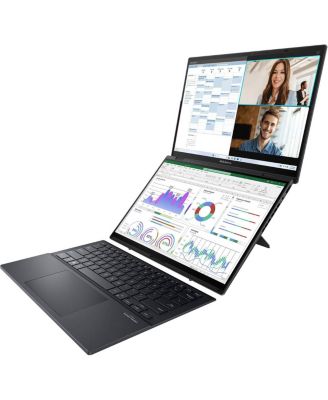
ASUSZenBook Duo UX8406CA-DS79T 14" 3K 120Hz 2-In-1 OLED Touchscreen Laptop, Intel Core Ultra 7 255H 2.0GHz, 32GB RAM, 1TB SSD, Windows 11 Home
Product details
Web ID: 24217280Best Laptop for travelling
When you want to edit videos for a concert held in Sydney from New York, you will understand the value of ASUS Zenbook DUO
Customer review from https://www.asus.com
Increased Productivity, Solid Feel, Great Design
I love everything about my ASUS Zen Duobook, except for the microphone, which quit working after a week. But I sent it back for a replacement b/c I think this is an extremely well laid out versatile tablet/laptop that really boosts productivity. The 2 screens are not a gimmick and are incredibly helpful for me. The rest of the laptop just feels right: keys are the right size with just the right amount of tactile feel. Great design with a solid feel. Out of the 5 tablets I've owned, it is better than the Microsoft Surface and Surface Pro.
Customer review from https://www.asus.com
ilove!!!!
gorgeous! I am obsessed! Great for business and Creative works!
Customer review from https://www.asus.com
learning new computer
It is wonderful in normal single scream mode. But I can't figure out how to use both screens. I've searched utube w/out useful results. Ive been trying to do this without bothering the vendor. Think that is what I'll have to do. Can't find instructions in English on ASUS site.
Customer review from https://www.asus.com
Response from https://www.asus.com
Dear Rnfah, Thank you for your comment. We do understand the inconvenience this may have caused if you are experieincing difficulty using both screens on this laptop. To use both screens on this laptop, use the built-in kickstand and detach the Bluetooth keyboard to activate the second display, then use ScreenXpert gestures like a 5-finger outward flick to expand windows across both screens, 3-finger tap for virtual touchpad, or 6-finger tap for virtual keyboard, allowing you to drag, resize, and manage apps across the extended workspace. For helpful tips on how to this laptop, visit our Product Support page: https://www.asus.com/us/support/faq/1051888/ . Should you need further assistance with the product, please email me at cl-rodel@asus.com and I would be more than happy to help. Or, you are most welcome to call Product Support Hotline at: 1(888) 678-3688. Also, you can chat with an ASUS live support agent from the link: https://www.asus.com/us/support/article/1135/. Thank you for choosing an ASUS product. Regards, Rodel ASUS Customer Loyalty