
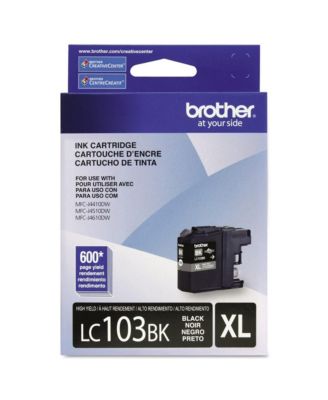
BrotherLC103BK 600 Page-Yield Innobella High-Yield Ink - Black
Product details
Web ID: 25941744Just In Time Delivery
The ink order arrived the day before my print job. Installation is consistently straightforward and simple.
Customer review from brother-usa.com
Great service
Outstanding service. Received in a great deal of time
Customer review from brother-usa.com
Disappointing….to say the least.
The printer is always running some type of cleaning or something of the sort. Whatever it is, uses up the ink. It is so frustrating to not have used the printer, only to go to use it and the cartridges are empty. I needed to print a return label before I head out of town, but can’t as the black is empty. Printed just fine 2 weeks ago and I haven’t used the printer since then. This is not something new and one reason I won’t be purchasing a brother printer again. Never had this problem with another brand. It will even say they are empty when there is clearly ink in them. Now to figure out how to get a document printed before I leave for out of town.
Customer review from brother-usa.com
Response from brother-usa.com
We would like to take this opportunity to thank you for your feedback. At Brother, customer satisfaction is something we take seriously. One factor that will affect your color ink consumption is the cleaning cycle of the machine. The machine is designed to automatically flush and clean all of the ink jet nozzles on a programmed schedule. During the cleaning process, the machine draws out a small amount of ink to remove air bubbles from the cartridge and to remove dust and dried ink from the ink nozzles and channels. This not only ensures premium print quality but also ensures the life of the print head. Because of the ink jet technology, this process is common to all ink jet machines. If you have any questions, our Brother Customer Support Team is available to assist you direct: www.brother-usa.com/brother-support https://www.brother-usa.com/brother-support
Ink is bad
Ever since Brother changed the cartridges to not having an orange plug the ink has not been working, I have tried two different cartridges and neither one work!
Customer review from brother-usa.com
Response from brother-usa.com
We are sorry to hear that you are experiencing issues with your Brother machine and the LC103BK ink cartridge. We know this is frustrating. We would love to hear from you with details to be able to get your machine up and running again. Our Brother Customer Support Team is on stand-by to provide quality products and service to our customers via online, email or live chat: www.brother-usa.com/brother-support
Don't Bother With Brother, Move On!
Now that Brother has discontinued the MFCs, it is trying to sell empty LC ink cartirdges or junk ink cartridges. My MFCJ4710DW worked just fine until I replaced the ink cartidges this week with authentic Brother brand LC103 ink cartridges, that came without the familiar orange and green keeper that must be removed before installation, from my local dealer. None of the new cartidges worked. My MFCJ4710DW says they are all empty. I've noticed other reviews on this page with the same complaint. Brother offers NO support! I have been unable to make any meaningful contact with Brother and no, chat doesn't count. Call 877-BROTHER, yeah, that's a joke too. An explanation is in order here.
Customer review from brother-usa.com
It's embedded in the software
When I first purchased the MFC J450DW the printer worked fine. Once it got passed a certain age I noticed that I was changing the ink even when it wasn't in use. I looked closely and found that the printer marked the cartridges as empty even when they are full. On further investigation I noticed that any new cartridge will be labeled "empty" after software updates. I have several "SETS" of ink that the printer will no longer take. All of them are full. I will not buy or recommend Brother products again.
Customer review from brother-usa.com
Response from brother-usa.com
Stated page yields for genuine Brother cartridges are based on the ISO testing standards. The number of pages that can be printed with a cartridge is affected by several factors, including paper size, number of pages per print job, amount of print on each page, font size, and print content (graphics, charts, etc.). Print jobs with large text fonts, graphics, charts, and/or large amount of solid coverage (black or any given color) will use much more toner and will shorten the life of the toner cartridge. Please verify you have purchased a new Brother Genuine cartridge by following the steps on this website: https://www.brother-usa.com/supplies/ink-and-toner/security If you have any questions about your Genuine cartridge, please contact Brother customer service at www.brother-usa.com/support.
disappointing
I maybe got 50 pages out of the ink, beyond disappointing. My old Brother printer broke so bought a new one that takes this ink and it just eats the ink so quickly and the print quality isn't even good. The old Brother printer I had was amazing, ink lasted forever but they don't make that model anymore. And clearly the quality has gone way down.
Customer review from brother-usa.com
Response from brother-usa.com
Stated page yields for genuine Brother cartridges are based on the ISO testing standards. The number of pages that can be printed with a cartridge is affected by several factors, including paper size, number of pages per print job, amount of print on each page, font size, and print content (graphics, charts, etc.). Print jobs with large text fonts, graphics, charts, and/or large amount of solid coverage (black or any given color) will use much more toner and will shorten the life of the toner cartridge. Please verify you have purchased a new Brother Genuine cartridge by following the steps on this website: https://www.brother-usa.com/supplies/ink-and-toner/security If you have any questions about your Genuine cartridge, please contact Brother customer service at www.brother-usa.com/support.
Reliable
I print packing slips for my customer's orders all day long, as well as occasionally printing out high-quality pictures using my printer's photo print setting. This ink (black and color) has never disappointed me. I've had my Brother MFC-J470DW printer for almost 10 years now, and it's been a vital tool in my office daily. It's sad that this model has been discontinued (years ago), and now I worry that at some point, they'll stop making the ink too. I hope not!
Customer review from brother-usa.com