
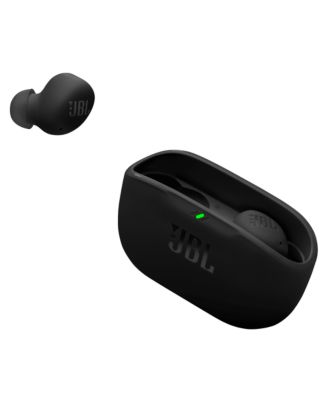
JBLVibe Buds 2 True Wireless Earbuds
Product details
Web ID: 24255781Water resistant for the win
Ive had these for a couple weeks now and no regrets. Sound is amazing. The noise canceling is flawless and I thought the case was a little risky but ive yet to lose a bud. Except for the one time I did by my own gratefulness and a small dog ate it the moment it hit the floor. (Dog is fine a little hydrogen peroxide made him throw it right up) but the amazing thing is. The sound, the features, the connectivity....perfect. Im impressed.
Customer review from jbl.com
Disappointed
Pretty disappointed in the fact that one of the Earbuds quit working, my husband hasn't even had the chance to use them a handful of times.
Customer review from jbl.com
Response from jbl.com
Thanks for your feedback. It's possible that the earbud is not charging, and charging issues are frequently caused by foreign matter on the metal charging contacts. This can include sweat, grease, dust, etc. You may click on the link below for detailed online instructions on how to clean the contact points of the earbuds. If the issue remains, please contact us for further assistance. Cleaning instructions: https://bit.ly/3S4bOkQ Contact us here: https://support.jbl.com/us/en/#contact
Good earbuds
Best earbuds I had yet works fine love them 10/10 definitely recommend to get these if you like small good earbuds
Recommends this product
Customer review from bloomingdales.com
Easy Listening
Recently received and I am pleased so far. Crisp sound and comfortable fit.
Customer review from jbl.com
Great sound!
I bought these for our youngest son, 20, for Christmas. We only use JBL, they have such great quality, and the prices are great!
Customer review from jbl.com
Great sound and fit
Never had any, so thought I'd try them and can say they're very nice.
Customer review from jbl.com
Ok, but not great
Couldn’t find a way to increase volume on headphones and when I looked it up (Tap, hold) it didn’t work. The earphones do not stay in my ear. I’ve tried the small medium and large, the medium fit the best but will fall out when I am doing simple tasks like putting laundry in basket from dryer. Sound quality is good, mic works well
Customer review from jbl.com
Response from jbl.com
Thanks for your feedback. Our JBL Vibe Buds 2 have a volume control that you can set up using our JBL Headphones app. We recommend downloading our app to modify the tap button settings.
Disappointing
Audio is decent quality, but the construction of the base and earbuds themselves is abysmal. The charging case has no lid, which means the earbuds can fall out at any given opportunity. Dropping the case is basically a guarantee that the earbuds will fall out (and likely end up in some difficult-to-reach area). I've had a few instances of these earbuds simply falling out on their own as well. I don't understand the logic behind this construction, as again, the earbuds are much more prone to falling out and getting lost somewhere. This is not the only issue with quality; the hard plastic on the left earbud is already coming apart after only a few months. I do not use these earbuds that frequently, and even if I did, it's very disappointing to have your earbuds break so quickly. Overall, I am incredibly disappointed with the quality of these earbuds, especially because I've been very happy with JBL's sound quality. I just wish the sound and construction were on the same level of quality. If you want JBL earbuds, get a pair that has a lid on the charging case.
Customer review from jbl.com
Response from jbl.com
We appreciate your detailed review. We understand your concerns regarding the construction, particularly the lidless charging case and the durability of the earbuds. We'll be sure to share this valuable feedback with our product development team for future enhancements.