
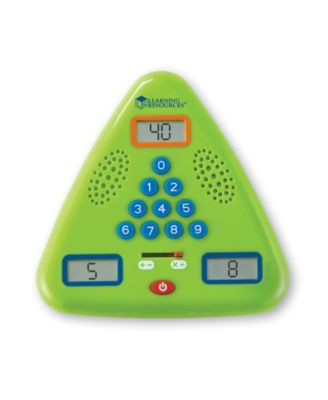
Learning Resources Minute Math Electronic Flash Card
Product details
Web ID: 7938905Ratings & Reviews
1 customer image

Good toy for learning while traveling
Great learning toy to keep in the car. A little tough to control what multiplication fact will appear, for example if you want to just review the 6's.
Customer review from learningresources.com
Students know the answer but can't find the button quickly
Most number key pads are arranged in a rectangular pattern, but the Minute Math Electronic Flash Card number key pad is set up in a triangular pattern. I understand how this pattern would fit better on a triangular fact-family flash card, but this confuses my students. My students know the answer, but are unable to locate the buttons they need before the time is up.
Customer review from learningresources.com
Response from learningresources.com
Thank you for sharing your experience with us, we are always looking for ways to improve our products and could not do that without your feedback. I'll be sure to pass this information along to our team.
Good idea but poor execution
We use Singapore Math so I thought this would be great for learning number bonds plus it includes addition/subtraction and multiplication/division so it grows with your child. Cons: yes you can turn off the sound but once you put your answer in it removes it and moves on so fast you have no idea if you were right or wrong. Also there is no chance to correct yourself. So what is the child really learning. Nothing. It quickly fastest to the next problem even if you turn off the timer. Also it would be helpful if the little screens were bigger so you can see the numbers more clearly. They are small and dark. They do not light up. I think this could be a great product and very helpful if they could work out these issues. Also a button that clearly says - sound on/sound off. It's for kids. Keep it simple and slow it down. There is a reason we are allowed to do "minute math" in school anymore and it's the frustration that comes from it.
Customer review from learningresources.com
Response from learningresources.com
Thank you so much for reaching out to us. We are always looking for ways to improve our products and could not do that without your feedback. I will be sure to pass this information along to our team. Once again, Thank you for your support in our products, we appreciate it.
read the instructions to turn off beeps or time pressure
Press the red POWER button to turn the unit on. from instructions Press and hold the POWER button to mute the sound and play in silence. Press the POWER button again to restore the sound. Press POWER button again to turn the game off. Slide the selector switch to choose addition/subtraction or multiplication/division drills. Level Select Press 1, 2 or 3 to select a skill level. The selected level will display in Screen 1. or multiplication tables 1, 2, 3, 5, and 10. Skill Level 2 - This level increases the difficulty by featuring numbers 10-20 in addition/subtraction, or multiplication tables 3-12. Skill Level 3 - Play this level for a real challenge. Addition/Subtraction features equations with multiples of 2, 3, 4, 5, and 10, all the way up to 150, and multiplication tables 0-12. The Minute Math drill begins after a five-second countdown. Players now have sixty (60) seconds to solve as many equations as they can by filling in the missing number. The missing number may appear in any one of the three display screens. NOTE - The number in Screen 1 will ALWAYS be the largest of the three numbers in any of the equations. See example on page 1. The unit makes a "positive" sound for correct answers and a "negative" sound for incorrect answers. In MUTE mode, the screen will flash to indicate correct answers. At the end of 60 seconds, the unit will display a score. Screen 2 will display the number of problems answered correctly, and Screen 3 will display the total number of equations. To play again, press any button to return to the Level Select screen. ********Note - To disable the 60-second timer************************* , when selecting a skill level, press and hold button (1, 2 or 3). The screen will flash briefly and the timer will be disabled for the game. This is a great way to practice solving unlimited math equations. To restore the timer function, select a new game by sliding the selection switch
Recommends this product
Customer review from learningresources.com
Will last for years
My daughter loves maths!! This has been a great addition to our home school learning. She likes the challenge of beating the buzzer. It is easy to use and has lots of levels and sum options you can choose additions, subtraction, multiplication or division. My daughter is 5 and on level one addition and subtraction so she will have many years worth of use before she reaches the higher levels.
Recommends this product
Customer review from learningresources.com
Stressful for trying to learn; fine if you already know
We bought this to help our daughter with memorizing her multiplication tables, but it gives so little time to answer that you cannot get it right if you have to sit and think for a few seconds; it is maddening and had my daughter in tears. I tried repeatedly to disable to timing function, without success. Only get this if your child already has them memorized.
Customer review from learningresources.com
Terrible and frustrating
Terrible product! It says you can turn the timer off but it still only gives a few seconds for each problem. My highly intelligent straight A student couldn't handle it! I literally threw it in the trash.
Customer review from learningresources.com
Doesnt work.....very difficult to operate
Please do not buy this and waste your time....the instructions are horrible and i tried all options but it doesn't work....as a parent if i am unable to play i dont think kids can use this....strongly will not recommend anyone...i googled it for help but no luck....no videos any where to follow....
Customer review from learningresources.com