
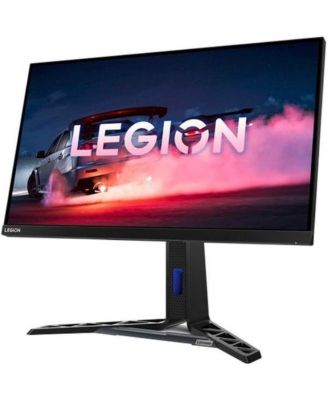
66F7GAC3US 27 in. Y27Q-30 F22270QY0 WQHD WLED LCD Monitor, Raven Black
Product details
Web ID: 17779330Ratings & Reviews
1 customer image

GOOD MONITOR
Buen monitor,buen brillo, buen tamano.Recomendado 100%.
Recommends this product
Customer review from lenovo.com
Great Monitor!
Excellent graphics. Reduced eye strain. Perfect size!
Recommends this product
Customer review from lenovo.com
Well-made machine
Appreciate the quality of materials-the stand is made of metal, not plastic. Appreciate the way it can be moved to fit where I need it, and the angle, including the vertical option even if I'm not sure I'll use it that way.
Recommends this product
Customer review from lenovo.com
quality colors and refresh rate.
Better than expected screen, picture color results keeps me wanting to look at images all day. Only problem is, the instructions do not show a USB type C cable connection for a laptop.
Recommends this product
Customer review from lenovo.com
Gaming Monitor
Excellent motor at a great value. My son loves it !
Customer review from lenovo.com
USB power issue on monitors
(This review was collected as part of a promotion.) USB A’s do not have power. Second set where this occurs and ongoing issue Lenovo is known for. Like they are USB’s. Get it sorted!!!
Customer review from lenovo.com
Response from lenovo.com
Thank you for taking time to provide feedback on your experience with our Lenovo product. We apologize for any inconvenience you experienced. We understand your frustration. In order to save power, by default, Windows switches your USB controllers off when they are not in use, and switches them back on again when they are needed. Unfortunately, sometimes this approach does not work as intended, and Windows fails to switch your USB controllers on again. To rule this out as the cause of your USB woes, just stop Windows from ‘managing’ power to your USB controllers and devices: 1) Open Device Manager (type “Device Manager” in the Windows search field) 2) Expand the Universal Serial Bus controller’s branch 3) Double-click the first USB Root Hub device in the list (if you see only one USB Root Hub device that is fine) 4) Click the Power Management tab 5) Un-check the Allow the computer to turn off this device to save power checkbox, and click OK. 6) Repeat steps 3-5 for each USB Root Hub device in your list of Universal Serial Bus controllers If the issue persists, please contact our technical support team at https://support.lenovo.com/ca/en/ for further assistance. Please let us know if this helps! Sincerely, Poornima_Lenovo
One of the best IPS you can buy.
(This review was collected as part of a promotion.) Worked as intended, and good for the price. Build quality is above and beyond similar products. Resolution is clear and colours are sharp and bright.
Recommends this product
Customer review from lenovo.com
Excellent monitor
Excellent monitor. Bought it to replace a 24" from another company. This is very sharp and easy on the eyes.
Recommends this product
Customer review from lenovo.com