
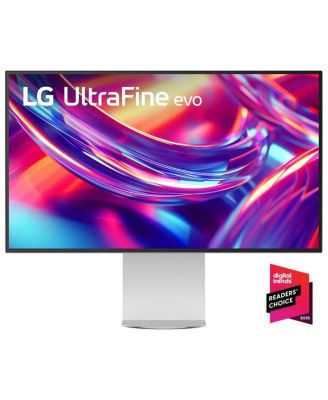
LGUltraFine evo 32U990A-S 31.5" 16:9 6K Nano IPS Black LCD HDR Monitor, White
Product details
Web ID: 25410193Can’t run more than 2 on Mac.
The new 2025 Mac Studio M4 Max and the MacBook m4 pro max cannot run more than 2 of these at a time via TB5. Take too much power.
Customer review from lg.com
Response from lg.com
Hello. Thank you for sharing your experience with your LG Monitor. We appreciate your feedback regarding the use of LG monitors with the 2025 Mac Studio M4 Max and MacBook M4 Pro Max, specifically the limitation you’ve encountered when attempting to run more than two units via Thunderbolt 5 due to power demands. To allow us to properly investigate the details of your specific product model and to see if there is anything we can do to assist with this monitor compatibility and power delivery issue being encountered, please send us an email at lgdigitalcare@lg.sprinklrsupport.com if you need further assistance. ^James
32 Inch 6K Monitor
I recently upgraded to the LG 32-inch 6K monitor, and it has noticeably improved my workspace. The design is sleek and modern, and while the bezels are slightly more visible than they appear in the online photos, the overall look is still very refined. Setup was simple with only a few main components, and the display quality is impressive right out of the box. The extra screen space has made a big difference in how efficiently I can work, especially when using several programs at once. Connecting my devices through the high-speed port was smooth, and once everything was configured, the monitor performed without any issues. The built-in speakers aren’t the strongest, but that’s easy to overlook since most people use external audio anyway. Overall, it’s a beautiful, high-resolution display that adds both style and functionality to a workspace. Review submitted as part of a program that provides a purchase discount.
Customer review from cohley.com
Response from cohley.com
Hello, Kayla. What an awesome upgrade — thanks for sharing your experience! We’re thrilled to hear how the LG 32‑inch 6K monitor has elevated your workspace with its sleek design, impressive display quality, and extra screen space that makes multitasking so much smoother. It’s great to know setup was simple and performance has been seamless, even if the built‑in speakers take a backseat to external audio. Sounds like it’s the perfect blend of style and functionality for your home office! For more feedback or questions, please send us an email at lgdigitalcare@lg.sprinklrsupport.com. Thanks for choosing LG! #LifesGood ^James
The Best Monitor for Professional Color Work
I’m a film editor and cinematographer, and I bought the LG 32U990A-S because I needed truly accurate, clean colors for grading and reviewing footage. After using it daily, I can say this monitor is absolutely worth it. The setup was simple. I plugged it in, adjusted a couple of settings, and the image already looked perfectly calibrated. What impressed me most is the color precision and overall uniformity across the entire screen. Skin tones look natural, shadows and highlights are exactly how I shot them, and I no longer second-guess my grades. The 32” size also gives me enough space for timelines, scopes, and full-screen previews without feeling cramped. It matches the product photos, feels premium in person, and has genuinely improved my workflow. If you work in post-production or care about accurate color, I highly recommend it this is the most reliable monitor I’ve used. Review submitted as part of a program that provides a purchase discount.
Customer review from cohley.com
Response from cohley.com
Hi, Olya. Thanks for reaching out to us! We totally get how important it is to have a monitor that gives you professional color accuracy. It's great to hear that you're happy with the LG Monitor (32U990A-S) model for your color-critical work. We're really glad you think it's the best! To ensure you maintain optimal color consistency for your professional work, here is a helpful tip: Perform hardware calibration regularly. Use LG True Color Pro software (or a compatible tool) and a colorimeter to create an accurate color profile, ensuring the monitor's display settings align with industry standards and your workflow needs over time. For more guidance, visit https://www.lg.com/us/support/help-library/lg-monitor-how-to-use-the-lg-calibration-studio--20153255638520. If you have any questions about advanced color settings or monitor features, please send us an email at lgdigitalcare@lg.sprinklrsupport.com. Thanks for choosing LG! #LifesGood ^LG Digital Care Team ^Juvy
Worth it
The exceptional color rendition and intuitive interface have significantly streamlined my Lightroom workflow, enhancing both speed and efficiency.
Customer review from lg.com
Next level monitor
This new LG 32” 6k Nano IPS Monitor is next level! I think it looks great on my desk in my home office. It comes with a sturdy base that has height adjustment built-in, which is really convenient since I no longer need to use a monitor arm. Setup was really easy, and I had it hooked up to my laptop within minutes. I was even able to connect my keyboard dongle to the back of the monitor, so I no longer need to connect it to my laptop. This is a 6k Nano IPS monitor so the picture quality is amazing! Videos and photos look great on it, and makes this monitor ideal for photo editing. It is also a large screen size, so when I am doing web development work, I can pull up documentation while still having my code up. Overall I would recommend this monitor because of the sleek design, screen size, and picture quality. Review submitted as part of a program that provides a purchase discount.
Customer review from cohley.com
Response from cohley.com
Hello! Thank you for sharing your detailed review. We’re thrilled to hear that the LG 32” 6K Monitor looks great in your home office, with a sturdy height-adjustable base that makes setup simple and convenient. It’s wonderful to know the picture quality is amazing for videos, photos, and photo editing, while the large screen size supports your web development work by letting you view documentation alongside your code. We’re delighted that the sleek design, easy connectivity, and overall performance have made this monitor such a valuable addition to your workspace. For more feedback or questions, please send us an email at lgdigitalcare@lg.sprinklrsupport.com. Thanks for choosing LG! #LifesGood ^James
THE BEST
This monitor is AMAZING! I'd give it 100/10 stars if I could. First of all, it was extremely easy to assemble took less than a couple of minutes. I just screwed the base together and then snapped on the monitor to the base. Second, it comes with every cord you will need and seamlessly connected to my Mac Mini with HDMI cord that was provided. It is large enough to have multiple programs open at once and the quality is insane! I do a lot of macro work and it didn't pixelate or dilute the quality of my videos to allow for easy editing an review. Review submitted as part of a program that provides a purchase discount.
Customer review from cohley.com
Response from cohley.com
Hello, Brittney! What an awesome review — your excitement is contagious! Sounds like this monitor slid right into your setup like it was meant to be there. Quick assembly, every cable you needed, and that seamless Mac Mini connection is exactly the smooth start we love hearing about. And the fact that it keeps your macro work crisp without any pixelation? That’s the OLED magic doing its thing. Thanks for sharing your experience and for being part of the review program. For more feedback or questions, please send us an email at lgdigitalcare@lg.sprinklrsupport.com. Thanks for choosing LG! #LifesGood ^James