
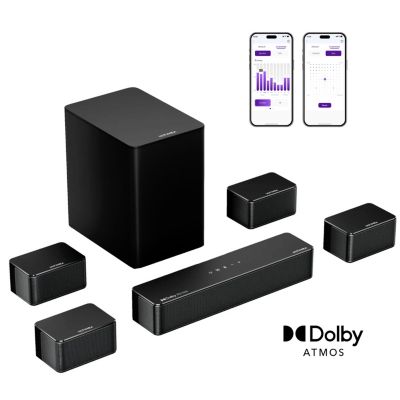
UltimeaPoseidon D80 Boom 7.1 Channel Sound bar with Dolby Atmos, Surround sound system for tv, 500W - Black
Product details
Web ID: 24562447Conforme et de qualité
Produits conformes et de bonne facture comme d'habitude
Recommends this product
Customer review from ULTIMEA
Sounds like i was there
I have the surround set for about 2 weeks now. It can only be describes as insane. Its absolutely amazing. Thanks for the people at Ultimea for the amazing service. Greetings from the Netherlands
Recommends this product
Customer review from ULTIMEA
D80 boom
Very good bit needs ability to add more speakers and control volume of each speaker
Customer review from ULTIMEA
Awesome sound, but your devices may need adjusting
Here’s a cleaned-up version with grammar fixes and clearer phrasing, while keeping your tone and content. tl;dr — Don’t trust the bad reviews. This system isn’t necessarily plug-and-play, and it can only process what your devices send it. A Blu-ray player might be plug-and-play, but does anyone use those anymore? I know I haven’t in 15 years. To get Dolby Atmos (or the best audio your device can output), there are settings you need to enable on your devices. Also, the media matters: if the content doesn’t include Dolby Atmos data, you won’t get Atmos-quality audio. You can’t blame Ultimea for poor device settings or low-quality media. Your best bet is to Google things like: “how do I enable Dolby Atmos on [XYZ device]”. On Windows, the Dolby Atmos app can help, but I found that software sometimes fights over audio processing when you really want the receiver to do the heavy lifting. For local media, I found MPC-BE with LAV Filters and bitstreaming enabled to be the most straightforward way to get the most out of this system. If you want the best performance, it’s going to take some effort on your part. I recently moved, and my 65" TV wouldn’t fit anywhere I wanted without being an eyesore. So instead of going smaller, I stepped into projectors with a 100" screen. I also decided to upgrade my sound from a Vizio 5.1 to the Poseidon D80 Boom. I bought this model specifically for the HDMI passthrough and app control. Because there isn’t much consensus in the reviews about the D80 Boom’s audio quality (and Ultimea products in general), I was a bit hesitant. I ended up pulling the trigger during the Black Friday sale. When I first set everything up, the sound was less than I had hoped, and my first reaction was, “Oh no—the bad reviews were right.” While testing different sources on my PC and tweaking settings, the sound was sometimes great and sometimes not. At times it felt like different audio formats were fighting each other, so I started researching. After about three hours of reading and testing, I dialed in the settings, and I now find the sound incredible for the price. My two main inputs are an NVIDIA Shield and my desktop PC (Windows 11) with an NVIDIA 3080. Below is what worked for me to make sure my devices were outputting the best audio possible for the soundbar/receiver to decode. First and foremost: to get Dolby Atmos from any device, it must be connected via HDMI 2.1 or eARC, using a cable that can handle the bandwidth. HDMI 2.0 will only get you compressed Atmos (and typically tops out at compressed formats rather than full lossless formats). NVIDIA Shield The Shield can output Dolby Atmos (when available), but you need to enable settings to make sure it prioritizes Atmos-capable output. Go to Settings → Display & Sound: Set Audio Format to Bitstream (Dolby Atmos/DTS:X) Enable HDMI-CEC For local files (Plex/Kodi), enable Audio Passthrough in those apps’ advanced settings (for TrueHD/DTS-HD where applicable) Once set up, the Shield will send the best audio it’s capable of, and you can control volume with the Shield remote. Windows 11 PC (this took the most time) On PC, the biggest limitation is often the playback software. I used to swear by VLC—great for video—but the audio control left a lot to be desired in my testing. After trying several options, I found MPC-BE to be the best for proper audio passthrough/bitstreaming. It won’t “just work” out of the box, though—you need to configure it. What you need to do: Download and install LAV Filters Add/enable them in MPC-BE Enable bitstreaming (this sends the raw audio to the receiver unprocessed, so the receiver does the decoding) Once configured correctly, the sound from the D80 is mind-blowing. For testing, there are Dolby Atmos demo files out there. I used “Dolby Atmos Object Demo 2” by Listen to 360 (found via a forum link). It shows a visual “sound location” while playing, which makes it easy to confirm whether everything is set up correctly. The full setup is probably too long to include here, but if you Google: “mpc-be lav filter setup bitstreaming” you’ll find step-by-step guides. PC gaming and streaming For gaming and streaming on PC, you’ll likely want to install the Dolby Access / Dolby Atmos app and then enable Atmos in Windows sound settings. Again, it’s a process—Google: “enable Dolby Atmos Windows 11” and follow a current step-by-step guide. Bottom line: This system can sound excellent, but if your settings are wrong, it will absolutely disappoint—and many of the negative reviews sound like configuration issues rather than hardware problems.
Recommends this product
Customer review from ULTIMEA
Surpreendente pelo preço
Fiquei realmente surpreendido com as Ultimea 80D Boom. Pela faixa de preço, não esperava uma qualidade tão elevada. O som é claro, equilibrado e com uma presença que normalmente só encontro em equipamentos bem mais caros. Sinceramente, em relação qualidade‑preço, não conheço nada que ofereça melhor desempenho. O subwoofer é simplesmente extraordinário. A potência é impressionante, com graves profundos, fortes e muito controlados, capazes de encher a sala sem qualquer distorção. Não estava à espera de tanta força e definição num conjunto deste valor. No geral, superou completamente as minhas expectativas. Para quem procura o melhor desempenho possível sem gastar muito, este sistema é uma escolha que vale mesmo a pena.
Recommends this product
Customer review from ULTIMEA
Just great
Brillent surround system ,had it 4 weeks just the bees kness,s superb sound for movies and tv ,just fantastic for music.
Recommends this product
Customer review from ULTIMEA
happy customer.
excellent sound,
Recommends this product
The Poseidon D80: Best Sound System for the Price
As an avid movie and TV show watcher, and someone who has music playing constantly, the Poseidon D80 has been one of the best purchases I’ve made. For the price, the quality is honestly unbeatable, especially with the app control and all the features packed in. What Makes It a Standout: - Best value in its class - The sound quality, Dolby Atmos performance, and overall build feel way above its price point. - Insanely powerful (in the right way) - This system has more than enough output. In an apartment, anything stronger would be overkill. It fills the room effortlessly without shaking the walls, but could easily do so if you wanted. - Quick switching modes - The instant jump between Movie, Music, and Night Mode is a lifesaver. As a night owl in an apartment, the Night Mode’s reduced bass keeps things clear and immersive without disturbing anyone. - App control + EQ flexibility - Being able to tweak the sound or switch profiles from the app makes it incredibly easy to keep things balanced for apartment living. - Great for music lovers - Since music is a staple in my life, I appreciate how clean and full the sound is, tight bass, clear mids, crisp highs. - Minor Issues - Only odd thing or issue I've had was randomly the rear speakers had what sounded like wire or signal interference and it made an electronic hissing/screeching sound. I do have a lot of other electronics nearby and it only happened twice in 6 months but was easy and quick to resolve. I just unplugged from the Sub and re-adjusted some wire positions. - Possible Improvement - The app is amazing for control, but it is missing some options that you still must use the remote for like the global +/- sound adjustments for bass, mid, treble, and surround sound. Hopefully, they can add that in a future firmware or app update. Final Take: The Poseidon D80 delivers huge performance, smart features, and apartment‑friendly control at a price that feels almost too good. If you want cinematic sound and great music performance without going overboard or spending a fortune for another brand, this system nails it and is the one you want.
Recommends this product
Customer review from ULTIMEA