

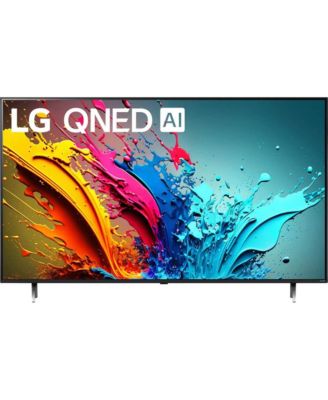
- Limited-Time Special
- Limited-Time Special


Good buy
Excellent. Once it settled down. WebOs froze first day and it needed reset but I find both its picture and sound great
Customer review from lg.com/uk
I am very happy with this product using past three months.
Customer review from lg.com
Good
Good so far. Good picture quality and volume. Good overall.
Customer review from lg.com/uk
LG 65QNED86T6A TV
Excellent TV, can't fault it for picture quality which is stunning.
Recommends this product
Customer review from lg.com/uk
Visually Stunning
The screen colours are so vivid that they jump out at you. There's still lots to learn about this TV, but so far, so good
Recommends this product
Customer review from lg.com/uk
Meh
Brightness is certainly not uniform across the screen with a lot of leeching into the blacks. Audio is catastrophic (the speakers are facing backwards?!?) which forced me to buy a soundbar (not happy about that). Software is rather buggy. Onboarding was hard and Netflix crashes daily. Plastic feels rather cheap for a TV which is supposed to be top of the range in its technology.
Customer review from lg.com
Response from lg.com
Thank you for sharing your detailed feedback. We sincerely apologize for the inconvenience and frustration you've experienced with your LG TV. Your concerns about uneven brightness, audio quality, software stability, and the build feel are important to us, and we appreciate your honesty. We can guide you through specific troubleshooting steps to fix the issue just email us at lgau.socialmedia@lge.com and please don’t hesitate to reach out if you need any help with adjustments or further support. We appreciate your patience and are committed to ensuring you have a satisfactory experience with our products.
Don`t like the remote.
As an old geezer of 82 i found it a bit complicated at first but i`m sure i will get the hang of it. The remote is not very user friendly. A simple press for subtitles would have been nice.
Customer review from lg.com/uk
Response from lg.com/uk
Thank you for your recently submitted review and we are really sorry to hear of your comments regarding the operation of your product. LG is always looking to improve its range of products with regards to software and hardware changes, we value your opinion and constructive feedback and would like to hear more about the bottlenecks you are experiencing. We have taken and passed on your feedback to the relevant areas within LG, we will strive to improve our products and literature with this valuable feedback, if you need to speak to our customer service team in the mean time they can be contacted directly by phone on 0344 847 5454 or via email or webchat via our website at https://www.lg.com/uk/support Regards
Sound not consistent
Every time I change channels or a TV commercial comes on I have to adjust the sound level. Anyone know why this is happening and what the fix is? Much appreciated.
Customer review from lg.com/ca
Response from lg.com/ca
We’re sorry to hear you’re experiencing volume changes when switching channels or during commercials — that can definitely be frustrating. Many LG TVs, including this model, offer an Auto Volume/Automatic Volume Adjustment feature that helps reduce differences in volume between different channels, broadcasts, and content types by keeping the audio level more consistent across programming. You can usually find and turn this on by going to Settings → All Settings → Sound → Advanced Settings → Automatic Volume Adjustment (or Auto Volume) and setting it to On. This can help minimize the need to constantly adjust the volume manually. If enabling Auto Volume doesn’t fully resolve the issue, it may also be influenced by how different broadcasters mix their audio — some channels or commercials are produced with louder mixes than others, which is common across TVs. Should you still need help or want assistance with settings or tuning the audio behavior, please don’t hesitate to contact LG Customer Support at 1-888-542-2623, Monday–Sunday, 8 a.m. to 9 p.m. ET.